Updated on November 28, 2025, by OpenEDR
If you’ve ever managed enterprise devices or overseen IT operations, you’ve likely used Software Center—one of the most essential tools in the Microsoft Endpoint Configuration Manager (MECM/SCCM) ecosystem. Many IT managers and cybersecurity teams depend on Software Center to deploy applications, push updates, enforce compliance, and remotely manage software installations securely.
In this guide, we’ll break down what Software Center is, how it works, why it matters, and how organizations can leverage it to strengthen their network security, endpoint visibility, and operational efficiency.
Whether you’re a cybersecurity analyst, enterprise IT admin, or business leader overseeing technology infrastructure, understanding Software Center will help streamline app delivery and improve device compliance across your organization.
What Is Software Center? (Simple Definition)
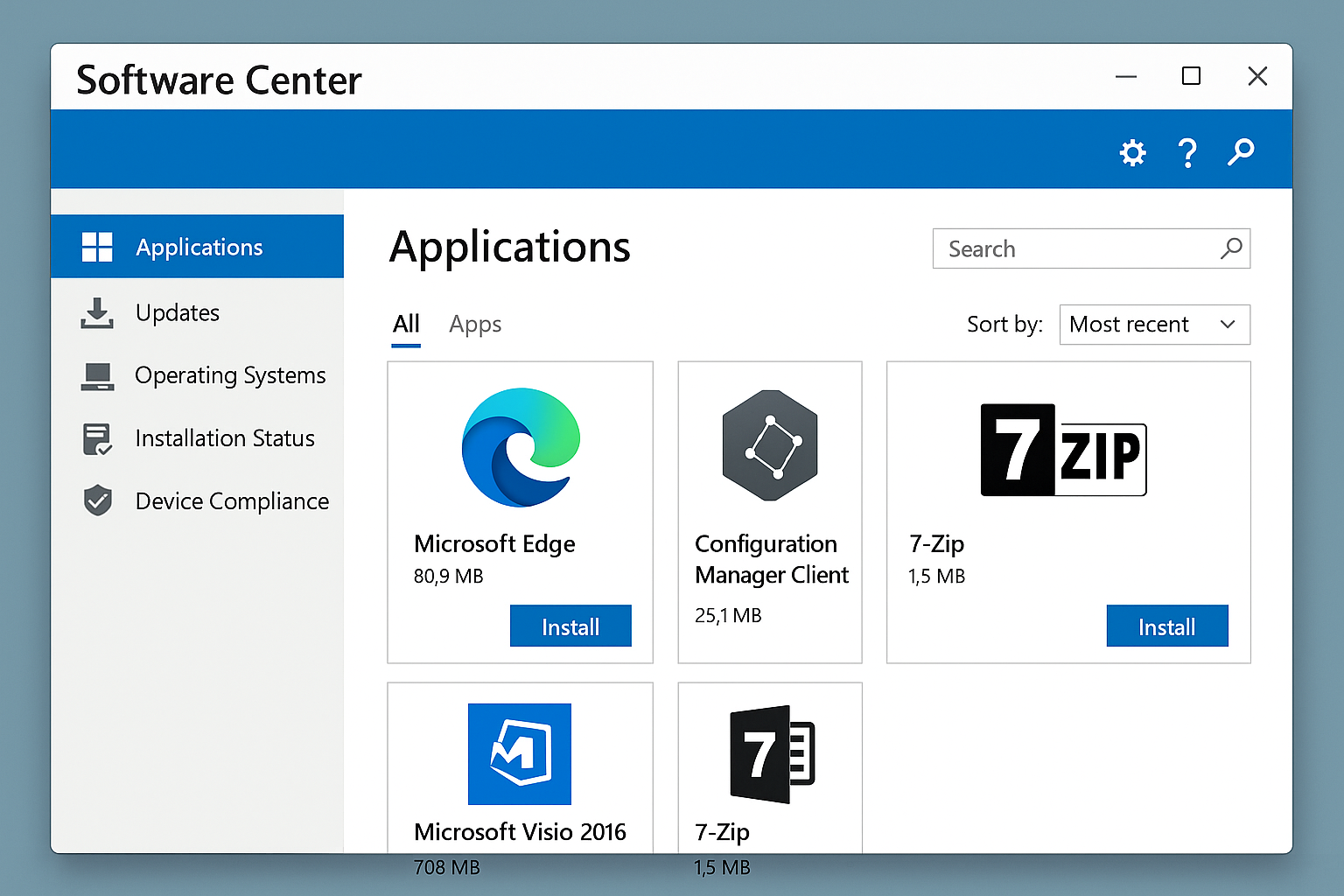
Software Center is a Windows application used to install software, apply updates, manage configurations, and monitor device compliance in environments managed by Microsoft Endpoint Configuration Manager (previously SCCM).
Think of it as your organization’s self-service software portal, enabling employees and IT teams to:
Install required or optional apps
Receive OS and security updates
Track installation progress
Maintain compliance
Improve security posture
Departments rely on Software Center because it standardizes software delivery and reduces the risks that come from manual installations or unsafe downloads.
Why Software Center Matters in Today’s Enterprise Environment
Managing software across hundreds or thousands of devices is complex. Software Center simplifies this—and strengthens enterprise security at the same time.
Here’s why businesses rely on it:
1. Secure Software Deployment
Software Center ensures apps come from verified, IT-approved sources, eliminating the risk of:
Shadow IT
Malicious downloads
Unauthorized software
Unpatched versions
This reduces the most common attack vectors.
2. Streamlined Patch & Update Management
Unpatched devices are among the top causes of breaches. Software Center enables:
Automatic updates
Centralized patch deployment
Real-time progress monitoring
This reduces vulnerabilities before attackers can exploit them.
3. Improved Device Compliance
With Software Center, IT can monitor and enforce compliance:
Windows updates
Endpoint configuration
Security baselines
Required apps
Compliance is crucial for industry regulations like HIPAA, PCI, NIST, and ISO 27001.
4. Reduced IT Workload
Instead of users requesting installations, Software Center empowers them to install pre-approved software themselves.
5. Supports Cybersecurity Strategy
Software Center works alongside endpoint security tools to strengthen defense layers and reduce exposure.
How Software Center Works
Let’s break down the core functions.
1. Applications Tab
This is where users find:
Required software
Optional apps
Organization-approved tools
Each app includes details such as size, version, and installation status.
2. Updates Tab
Displays all pending updates including:
Security patches
Feature updates
Cumulative patches
This ensures devices stay protected.
3. Operating Systems Tab
Used for:
OS upgrades
Wipe & reload options
Device reimaging (when enabled)
4. Installation Status
Shows:
Active installations
Failed installations
Past installations
Retry options
Helpful for troubleshooting.
5. Device Compliance
Checks system status against company security policies:
Antivirus
Encryption
Firewall settings
OS version
If a device fails compliance, it may lose access to corporate resources.
Why IT Administrators Rely on Software Center
Software Center integrates tightly with SCCM/MECM, giving admins full control over:
Application lifecycle
Deployment scheduling
Device targeting
Remote management
Patch automation
This helps organizations scale operations efficiently while maintaining strong security controls.
Key Features of Software Center
Let’s explore its most impactful features.
1. Self-Service Software Installation
Users can install approved applications without administrative rights.
Benefits:
Reduces ticket volume
Prevents unsafe downloads
Improves productivity
2. Centralized Patch Management
Software Center ensures consistent patch levels across the environment.
3. Required Application Enforcement
Admins can force-install critical applications silently.
4. Scheduling Control
Users can schedule installations when convenient—reducing interruptions.
5. Deployment Deadlines
Mandatory updates or reboots can be scheduled for enforcement.
6. Multi-Device Support
Works seamlessly across domain-joined Windows devices.
7. Auditing & Reporting
Necessary for compliance, security audits, and performance monitoring.
Security Risks Software Center Helps Prevent
Software Center directly reduces major cybersecurity risks such as:
1. Malware Installation
By locking down app sources.
2. Unpatched Vulnerabilities
By managing updates centrally.
3. Lateral Movement
By keeping endpoints aligned with security baselines.
4. Phishing Download Exploits
Employees no longer download tools from unknown websites.
5. Unauthorized Software Usage
Such as:
Torrent apps
Remote access tools
Keyloggers
VPN tunnels
IT maintains control of approved software lists.
Software Center vs Microsoft Store: What’s the Difference?
| Feature | Software Center | Microsoft Store |
|---|---|---|
| Enterprise-focused | ✔️ | ❌ |
| IT-controlled apps | ✔️ | ❌ |
| Supports on-prem SCCM/MECM | ✔️ | ❌ |
| Enforces security policies | ✔️ | ❌ |
| User installs public apps | ❌ | ✔️ |
Software Center is built for enterprise-grade security and management, not general app downloads.
Common Software Center Issues & Fixes
1. Software Not Showing
Try:
Restarting device
Forcing machine policy refresh
Checking network connection
2. Installation Failures
Often caused by:
Corrupt cache
Missing dependencies
Insufficient space
Clear cache from:
C:\Windows\ccmcache
3. Slow Downloads
Usually due to:
Network restrictions
Distribution point issues
4. Missing Restart Prompts
Ensure MECM restart settings are configured correctly.
Best Practices for IT Managers Using Software Center
1. Keep Software Catalog Clean
Remove outdated apps that confuse users.
2. Enforce Compliance Baselines
Strengthen security posture.
3. Monitor Deployment Reports
Use SCCM reporting tools for visibility.
4. Automate Patching
Reduce vulnerabilities quickly.
5. Integrate with Endpoint Security Tools
Pair with:
EDR/XDR
Zero Trust
Firewall rules
Device compliance management
Software Center’s Role in Cybersecurity Frameworks
Software Center aligns with modern cybersecurity frameworks such as:
NIST CSF
CIS Controls
Zero Trust Architecture
It supports:
Patch management
Device hygiene
Controlled software deployment
Vulnerability reduction
Future Trends: What’s Next for Software Center?
With increasing cloud adoption, Software Center is evolving into a hybrid-cloud solution.
Future trends include:
Cloud-based deployment via Intune
AI-driven update automation
Deeper compliance analytics
Zero-touch provisioning
Hybrid SCCM + Intune management is becoming the standard for enterprise networks.
FAQs: Software Center
1. What is Software Center used for?
It is used to install software, apply updates, and maintain device compliance in enterprise Windows environments.
2. Is Software Center the same as SCCM?
No. SCCM is the management platform; Software Center is the user-facing application.
3. Who controls what appears in Software Center?
IT administrators using SCCM/MECM.
4. Can Software Center install apps without admin rights?
Yes—users can install approved apps without elevated privileges.
5. Does Software Center work with Intune?
Yes, in co-managed hybrid environments.
Final Thoughts
Software Center is one of the most powerful tools for managing enterprise devices, enforcing compliance, reducing cybersecurity risks, and improving productivity. It helps organizations deploy software securely, manage patches efficiently, and maintain consistent device health—all essential for modern IT and security operations.
If your organization wants stronger endpoint protection, faster incident response, and real-time threat detection, pairing Software Center with a robust EDR platform is the next step.
🚀 Boost Your Security With OpenEDR®
👉 Register here: https://openedr.platform.xcitium.com/register/

 Loading...