Updated on June 5, 2026, by OpenEDR
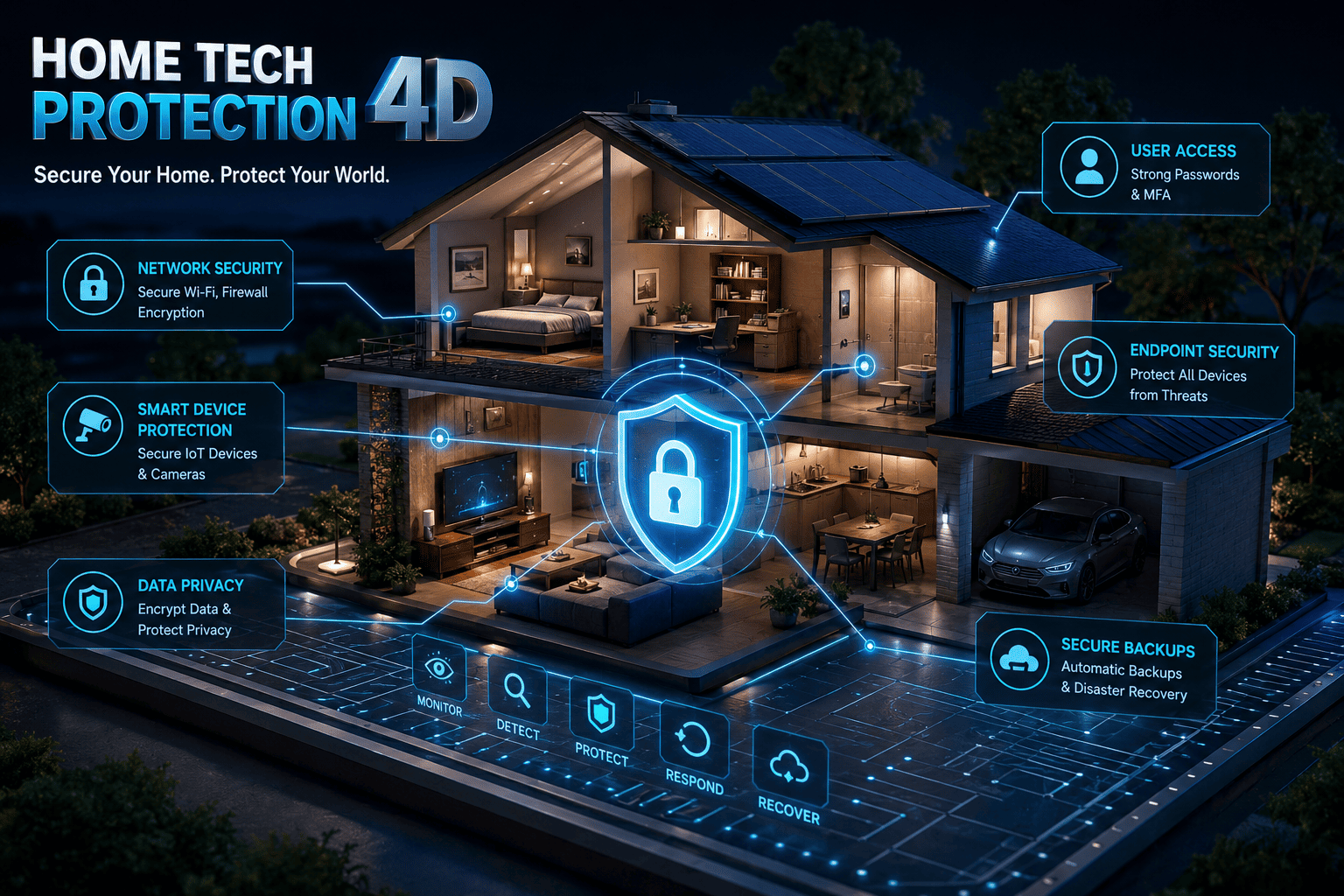
In today’s digital world, home tech protection has become more important than ever. How many internet-connected devices do you have in your home right now? Between smartphones, laptops, smart TVs, gaming consoles, security cameras, and smart home assistants, the average household manages dozens of connected devices daily. While these technologies make life more convenient, they also create new opportunities for cybercriminals.
Many people assume cyberattacks only target large businesses. However, home networks have become attractive targets for hackers looking to steal personal information, financial data, passwords, and even access connected devices. Without proper home tech protection, a single vulnerable device can put your entire digital ecosystem at risk.
This guide explains why home tech protection matters, the biggest threats facing connected homes, and the practical steps every household can take to stay secure.
Why Home Tech Protection Matters More Than Ever
The modern home is no longer just a living space. It is a digital hub where people work, shop, bank, stream content, and manage personal information.
Every connected device creates a potential entry point for cybercriminals. If attackers gain access to one device, they may be able to move across your network and compromise additional systems.
Strong home tech protection helps:
- Protect personal and financial information
- Prevent identity theft
- Secure online banking activities
- Keep smart home devices safe
- Prevent ransomware attacks
- Protect family privacy
- Reduce the risk of unauthorized network access
As cyber threats continue to evolve, proactive home tech protection has become a necessity rather than an option.
Common Cyber Threats Targeting Home Users
Understanding the risks is the first step toward effective home tech protection.
Phishing Attacks
Phishing remains one of the most common cyber threats. Attackers send fraudulent emails, text messages, or social media messages designed to trick users into revealing sensitive information.
Warning signs include:
- Urgent requests for action
- Suspicious links
- Unknown senders
- Unexpected attachments
- Requests for passwords or payment information
Ransomware
Ransomware encrypts files and demands payment for their release. Home users increasingly face ransomware attacks through malicious downloads, phishing emails, and compromised websites.
Malware Infections
Malware includes viruses, spyware, trojans, and other malicious software that can damage systems or steal information. Effective home tech protection requires reliable malware prevention and detection.
Smart Device Vulnerabilities
Internet of Things (IoT) devices often prioritize convenience over security. Smart cameras, doorbells, thermostats, and speakers can become vulnerable if not properly secured.
Password-Based Attacks
Weak or reused passwords make it easy for attackers to gain unauthorized access to accounts and devices.
Essential Home Tech Protection Strategies
Implementing a layered security approach significantly improves home tech protection.
Use Strong and Unique Passwords
Passwords remain the first line of defense for most online accounts.
Best practices include:
- Use at least 12-16 characters
- Combine uppercase and lowercase letters
- Include numbers and symbols
- Avoid personal information
- Never reuse passwords across accounts
Password managers can help generate and store complex credentials securely.
Enable Multi-Factor Authentication (MFA)
Multi-factor authentication adds an additional verification step beyond passwords.
Even if an attacker steals your password, MFA can prevent unauthorized access by requiring:
- Authentication apps
- Security keys
- Biometrics
- Verification codes
MFA is one of the most effective home tech protection measures available.
Keep Software Updated
Software updates often contain critical security patches.
Regularly update:
- Operating systems
- Mobile devices
- Web browsers
- Smart home devices
- Security software
- Applications
Automatic updates can help ensure vulnerabilities are addressed quickly.
Securing Your Home Network
Your home network serves as the foundation of your home tech protection strategy.
Change Default Router Credentials
Many routers ship with default usernames and passwords that are publicly known.
Immediately:
- Change the default administrator password.
- Update the network name (SSID).
- Disable unnecessary remote access features.
Use Strong Wi-Fi Encryption
Configure your router to use:
- WPA3 encryption whenever available
- WPA2 if WPA3 is not supported
Avoid outdated encryption protocols such as WEP.
Create a Guest Network
A guest network separates visitor devices from your primary network.
Benefits include:
- Reduced security risks
- Better privacy
- Limited access to sensitive devices
This simple step strengthens overall home tech protection.
Protecting Smart Home Devices
Smart home technology continues to grow rapidly. Unfortunately, many users overlook device security.
Secure Every Connected Device
For each smart device:
- Change default passwords
- Enable automatic updates
- Disable unused features
- Review privacy settings
- Remove devices you no longer use
Segment Smart Devices
Whenever possible, place smart devices on a separate network segment or guest network.
This limits the damage if one device becomes compromised.
Buy Security-Conscious Products
When purchasing smart devices, choose vendors with:
- Regular firmware updates
- Strong security track records
- Transparent privacy policies
- Security certifications
Effective home tech protection starts before a device even enters your home.
Protecting Personal Data and Privacy
Cybersecurity is not just about devices—it is also about protecting information.
Limit Data Sharing
Review privacy settings on:
- Social media platforms
- Mobile apps
- Smart home devices
- Online accounts
Share only necessary information.
Use Secure Browsing Practices
Always:
- Verify website URLs
- Look for HTTPS encryption
- Avoid suspicious downloads
- Be cautious with public Wi-Fi
These habits contribute significantly to stronger home tech protection.
Monitor Financial Accounts
Regularly check:
- Bank accounts
- Credit card statements
- Online payment services
Early detection helps minimize financial losses.
The Role of Endpoint Security in Home Tech Protection
Traditional antivirus software is no longer enough to stop modern threats.
Advanced endpoint protection provides:
- Behavioral threat detection
- Real-time monitoring
- Malware prevention
- Ransomware protection
- Automated threat response
As cyberattacks become more sophisticated, endpoint security has become a critical component of effective home tech protection.
Key Benefits of Endpoint Security
Organizations have long relied on endpoint security to protect business systems. Home users can benefit from the same technologies by:
- Detecting threats before damage occurs
- Blocking malicious applications
- Monitoring suspicious activity
- Preventing unauthorized access
A proactive approach provides better protection than relying solely on traditional antivirus software.
Creating a Home Cybersecurity Checklist
To improve your home tech protection, use this simple checklist:
✔ Use strong unique passwords
✔ Enable multi-factor authentication
✔ Update software regularly
✔ Secure your Wi-Fi network
✔ Change default router credentials
✔ Back up important files
✔ Install endpoint protection
✔ Secure smart home devices
✔ Monitor financial accounts
✔ Educate family members about phishing
Consistently following these practices can significantly reduce cyber risk.
The Future of Home Tech Protection
Cyber threats will continue to evolve as homes become more connected.
Emerging technologies such as:
- Artificial intelligence
- Smart automation
- Connected appliances
- Remote work environments
will create both new opportunities and new security challenges.
As technology advances, maintaining strong home tech protection will require ongoing vigilance, education, and investment in modern security solutions.
Conclusion
The number of connected devices in modern households continues to grow, making home tech protection a critical priority for families, professionals, and business leaders alike. From securing home networks and smart devices to implementing strong authentication and endpoint protection, every security measure plays a role in reducing cyber risk.
Cybercriminals constantly search for vulnerable targets, but proactive security practices can help keep your devices, personal information, and digital life protected.
Ready to strengthen your cybersecurity posture? Explore advanced endpoint protection solutions and take control of your digital security today:
👉 https://openedr.platform.xcitium.com/register/
Frequently Asked Questions
What is home tech protection?
Home tech protection refers to the security measures used to safeguard connected devices, home networks, personal data, and smart home systems from cyber threats such as malware, ransomware, phishing attacks, and unauthorized access.
Why is home tech protection important?
Home tech protection helps prevent identity theft, financial fraud, data breaches, privacy violations, and device compromise. It protects both individuals and families from growing cyber risks.
How can I improve my home network security?
You can improve security by changing default router credentials, using WPA3 encryption, enabling multi-factor authentication, creating a guest network, and regularly updating firmware and software.
Do smart home devices need cybersecurity protection?
Yes. Smart home devices can become entry points for cybercriminals if left unsecured. Strong passwords, firmware updates, and network segmentation can help protect them.
Is endpoint security necessary for home users?
Yes. Modern endpoint security provides advanced protection against malware, ransomware, and other cyber threats that traditional antivirus solutions may miss.

 Loading...