
Updated on May 11, 2026, by OpenEDR
Cyberattacks are growing more advanced every year. Password theft, phishing scams, and credential-based attacks continue to target businesses of all sizes. In fact, compromised passwords remain one of the leading causes of data breaches worldwide. This is why many organizations are now turning to a hardware security key to strengthen authentication and protect sensitive systems.
A hardware security key adds a physical layer of protection that passwords alone cannot provide. Even if attackers steal login credentials, they still cannot access accounts without the physical key. For IT managers, cybersecurity professionals, CEOs, and business leaders, hardware-based authentication has become a critical part of modern security strategies.
In this guide, you will learn what a hardware security key is, how it works, why businesses use it, and how it helps defend against phishing, ransomware, and account takeover attacks.
What Is a Hardware Security Key?
A hardware security key is a physical authentication device used to verify a user’s identity during login. It works as an additional security layer beyond usernames and passwords. Hardware security keys support multi-factor authentication (MFA) and help prevent unauthorized access to accounts and systems.
These devices commonly connect through:
- USB
- USB-C
- NFC
- Bluetooth
Hardware security keys are widely used for:
- Business account protection
- Cloud application security
- Remote workforce authentication
- Administrative access control
- Identity verification
Unlike passwords, which can be stolen or guessed, a hardware security key requires physical possession of the device to complete authentication.
How Does a Hardware Security Key Work?
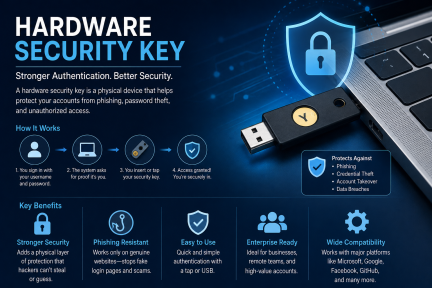
A hardware security key uses cryptographic authentication to verify user identity securely. When users attempt to log in, the key generates a unique authentication response that confirms the user is legitimate.
Here is a simplified overview of the process:
- The user enters their username and password
- The system requests hardware key authentication
- The user inserts or taps the security key
- The key generates a secure cryptographic response
- The system verifies the authentication request
Because the authentication process relies on cryptographic keys instead of reusable passwords, attackers cannot easily intercept or duplicate the credentials.
This method significantly improves cybersecurity protection against phishing and credential theft.
Why Businesses Use Hardware Security Keys
Organizations are increasingly adopting hardware security keys because password-only security is no longer enough.
Protection Against Phishing Attacks
Phishing remains one of the most common cyber threats. Attackers create fake login pages designed to steal usernames and passwords.
A hardware security key helps stop phishing because:
- Authentication only works with legitimate websites
- Attackers cannot reuse stolen passwords alone
- Fake login pages cannot complete cryptographic verification
Even if an employee accidentally enters credentials on a phishing site, the hardware security key prevents attackers from accessing the account.
Stronger Multi-Factor Authentication (MFA)
Traditional MFA methods like SMS codes are vulnerable to:
- SIM swapping
- Social engineering
- Interception attacks
Hardware-based MFA provides stronger security because the physical key must be present during login.
This reduces the risk of:
- Account takeover attacks
- Credential stuffing
- Remote unauthorized access
Improved Remote Work Security
Remote and hybrid work environments have expanded the attack surface for businesses. Employees now access company systems from:
- Home networks
- Mobile devices
- Public Wi-Fi
- Cloud applications
A hardware security key helps secure remote access by ensuring only authorized users can authenticate into corporate systems.
Key Benefits of Using a Hardware Security Key
Businesses gain several cybersecurity advantages when deploying hardware authentication solutions.
Reduced Credential Theft Risk
Passwords can be:
- Reused
- Shared
- Stolen
- Phished
- Cracked
A hardware security key minimizes these risks by requiring physical verification during login.
Better Protection for Privileged Accounts
Administrative accounts are high-value targets for cybercriminals. Attackers often seek privileged credentials to:
- Access sensitive systems
- Deploy ransomware
- Steal customer data
- Disable security tools
Hardware authentication adds stronger protection to privileged accounts and reduces unauthorized access risks.
Faster and Easier Authentication
Many users find hardware security keys easier to use than repeatedly entering one-time codes or answering verification prompts.
Authentication often takes only seconds:
- Insert the key
- Tap the device
- Approve the login
This improves user convenience while strengthening security.
Improved Compliance and Security Standards
Many industries require strong authentication controls to meet compliance regulations such as:
- HIPAA
- PCI DSS
- GDPR
- SOC 2
- ISO 27001
Using a hardware security key helps organizations improve identity security and support compliance requirements.
Common Types of Hardware Security Keys
Different organizations may choose different hardware authentication methods based on their security needs.
USB Security Keys
USB-based keys are among the most common options. Users insert the device directly into a computer during login.
Advantages include:
- Easy deployment
- Reliable connectivity
- Strong compatibility
NFC Security Keys
NFC-enabled hardware keys work with smartphones and tablets by tapping the device against the phone.
These are useful for:
- Mobile authentication
- Remote workforces
- BYOD environments
Bluetooth Security Keys
Bluetooth-enabled security keys provide wireless authentication capabilities.
These devices are commonly used for:
- Mobile access
- Tablets
- Devices without USB ports
Hardware Security Key vs Traditional MFA
Many businesses ask whether hardware keys are better than traditional MFA methods.
Comparison Table
| Authentication Method | Security Level | Phishing Resistance | Ease of Use |
|—|—|—|
| SMS Codes | Moderate | Low | Easy |
| Authenticator Apps | Good | Moderate | Moderate |
| Email Verification | Low | Low | Easy |
| Hardware Security Key | Very High | Very High | Easy |
Hardware security keys offer the strongest phishing-resistant authentication available for most organizations.
Industries That Benefit From Hardware Security Keys
Many industries now rely on hardware-based authentication to reduce cyber risk.
Healthcare
Healthcare organizations protect:
- Patient records
- Insurance information
- Medical systems
Hardware authentication helps reduce unauthorized access to sensitive healthcare data.
Financial Services
Banks and financial firms face constant cyber threats targeting:
- Banking credentials
- Payment systems
- Customer information
Hardware security keys strengthen financial cybersecurity controls.
Technology Companies
Technology businesses protect:
- Source code
- Cloud infrastructure
- Developer accounts
- Intellectual property
Strong authentication reduces insider and external attack risks.
Government and Public Sector
Government agencies use hardware authentication to secure:
- Sensitive systems
- Citizen data
- Critical infrastructure
- National security operations
Challenges of Implementing Hardware Security Keys
Although hardware authentication improves security, organizations should plan deployment carefully.
User Training Requirements
Employees may initially need guidance on:
- Device setup
- Backup authentication methods
- Security best practices
Clear training improves adoption and reduces login issues.
Device Management
Organizations must manage:
- Lost devices
- Replacement keys
- Backup authentication
- Device inventory
IT teams should establish clear policies for key management.
Compatibility Concerns
Some legacy systems may not fully support modern authentication standards such as:
- FIDO2
- WebAuthn
- U2F
Businesses should evaluate compatibility before deployment.
Best Practices for Using Hardware Security Keys
To maximize security benefits, organizations should follow several best practices.
Protect High-Risk Accounts First
Prioritize hardware security keys for:
- Administrators
- Executives
- Finance teams
- IT personnel
- Remote workers
These accounts face higher cyberattack risks.
Use Backup Authentication Methods
Organizations should maintain secure backup methods in case users lose their hardware key.
Options may include:
- Secondary security keys
- Recovery codes
- Identity verification procedures
Combine With Endpoint Security
Authentication security alone is not enough. Businesses should also deploy:
- Endpoint detection and response (EDR)
- Anti-malware protection
- Threat monitoring
- Behavioral analysis
Layered security improves overall cyber resilience.
The Future of Passwordless Authentication
Many organizations are moving toward passwordless security models. A hardware security key plays a major role in this transition.
Passwordless authentication offers:
- Better user experience
- Reduced phishing risks
- Lower password reset costs
- Stronger identity protection
As cyber threats evolve, hardware-based authentication will likely become a standard requirement across industries.
Frequently Asked Questions
What is a hardware security key used for?
A hardware security key is used to verify user identity during login and strengthen multi-factor authentication security.
Are hardware security keys safer than passwords?
Yes. Hardware security keys provide stronger protection against phishing, credential theft, and account takeover attacks than passwords alone.
Can a hardware security key stop phishing attacks?
Yes. Hardware security keys help prevent phishing because authentication only works with legitimate websites and approved systems.
What happens if a hardware security key is lost?
Organizations should use backup authentication methods such as recovery codes or secondary keys to restore access securely.
Do hardware security keys work with cloud applications?
Yes. Many cloud platforms and enterprise applications support hardware authentication using standards like FIDO2 and WebAuthn.
Final Thoughts
Cybersecurity threats continue to target passwords and user identities at an alarming rate. Businesses can no longer rely solely on passwords to protect sensitive systems and data.
A hardware sec+urity key provides stronger authentication security, improves phishing resistance, and helps organizations reduce the risk of account compromise. For IT managers, cybersecurity teams, and business leaders, hardware-based authentication has become an essential part of modern security strategies.
By combining hardware authentication with endpoint security, employee awareness training, and threat monitoring, organizations can significantly strengthen their cybersecurity posture.
Strengthen Your Endpoint Security Today
Protect your business from phishing, ransomware, credential theft, and advanced cyber threats with enterprise-grade endpoint security solutions from Xcitium.
Get started here:
https://openedr.platform.xcitium.com/register/

 Loading...