Updated on May 7, 2026, by OpenEDR
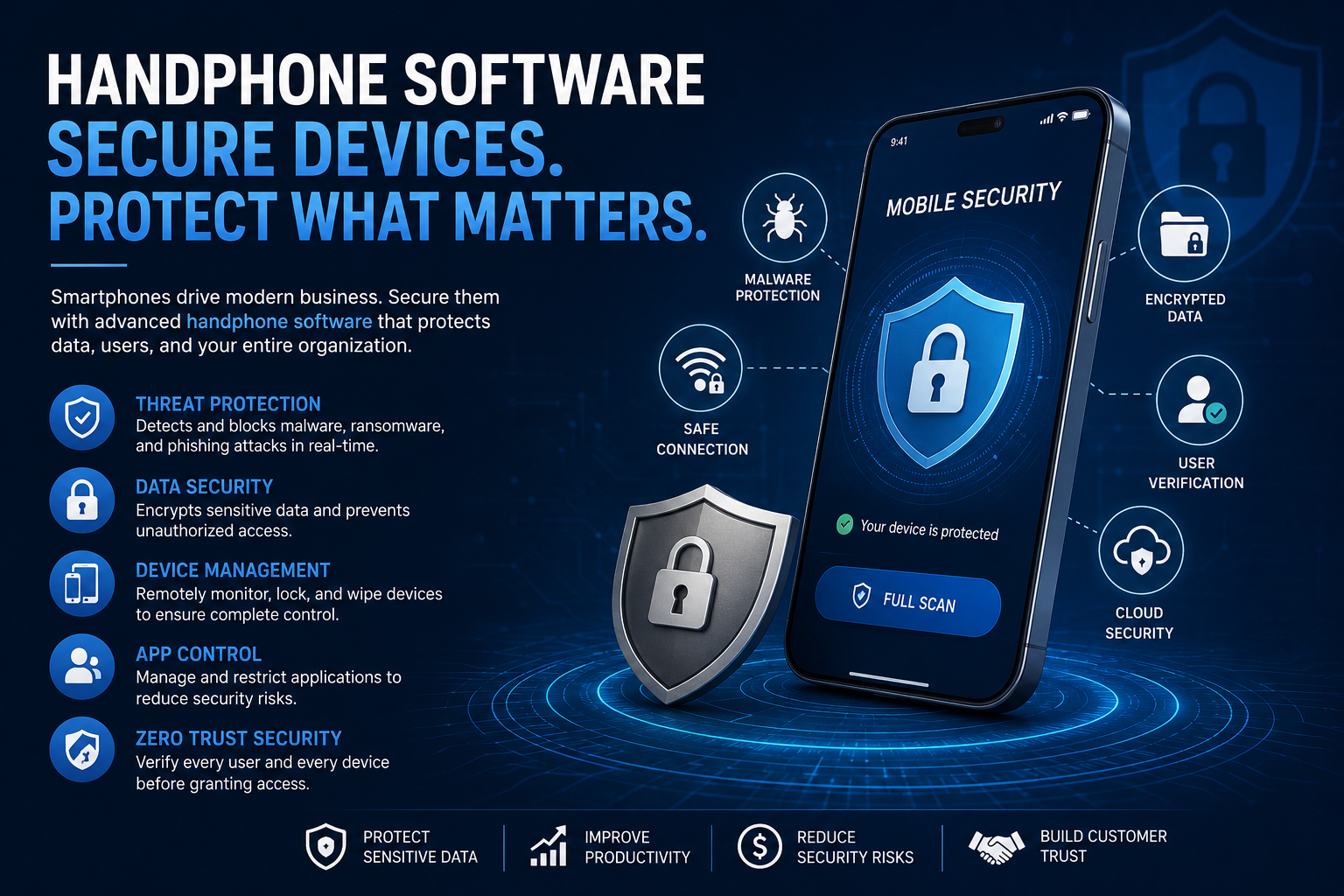
Mobile devices have become the backbone of modern business. From remote work and cloud collaboration to online banking and customer communication, companies now rely heavily on smartphones to keep operations moving. But as mobile usage grows, cybercriminals are paying attention. That is why investing in secure handphone software is no longer optional for organizations that want to protect sensitive data and maintain business continuity.
A single compromised device can expose confidential information, disrupt workflows, and damage a company’s reputation. According to recent cybersecurity reports, mobile malware attacks continue to increase every year, targeting businesses of all sizes. IT managers, CEOs, and security teams must now focus on advanced mobile protection strategies to stay ahead of evolving threats.
In this guide, we will explore how handphone software supports mobile security, the risks organizations face, the features businesses should prioritize, and the best ways to protect devices across industries.
What Is Handphone Software?
Handphone software refers to applications and operating systems designed for smartphones and mobile devices. It includes everything from communication apps and productivity tools to mobile security solutions and endpoint protection platforms.
In the cybersecurity world, handphone software often focuses on:
- Mobile device management (MDM)
- Malware protection
- Secure communication
- Threat detection
- Data encryption
- Application control
- Remote device monitoring
Modern businesses use handphone software to manage employee devices, protect sensitive data, and reduce cyber risks associated with remote work and mobile access.
As organizations adopt bring-your-own-device (BYOD) policies, secure mobile software has become a critical part of enterprise cybersecurity.
Why Mobile Security Matters for Businesses
Many companies still focus heavily on desktop and network security while overlooking smartphones and tablets. However, mobile devices are now one of the most common entry points for cyberattacks.
Cybercriminals target mobile devices because they often contain:
- Business emails
- Customer information
- Financial records
- Login credentials
- Cloud access tokens
- Corporate communication data
Without secure handphone software, attackers can exploit vulnerabilities through phishing links, malicious apps, unsecured Wi-Fi networks, or outdated operating systems.
Common Mobile Threats
Malware and Spyware
Mobile malware can steal data, monitor user activity, or allow remote access to devices.
Phishing Attacks
Employees may click fake login pages or malicious links sent through SMS, email, or messaging apps.
Ransomware
Mobile ransomware can lock files or devices until a payment is made.
Unsecured Public Wi-Fi
Hackers can intercept sensitive information transmitted over unsecured networks.
Malicious Applications
Fake or compromised apps may secretly collect credentials and business data.
Businesses that ignore mobile protection expose themselves to serious operational and financial risks.
Key Features to Look for in Handphone Software
Choosing the right handphone software requires more than basic antivirus protection. Organizations should look for advanced security features that provide layered defense against modern cyber threats.
Real-Time Threat Detection
Real-time monitoring helps detect suspicious behavior immediately before malware can spread or steal data.
Advanced mobile security tools use:
- Behavioral analysis
- AI-powered threat detection
- Cloud intelligence
- Machine learning
These technologies improve detection rates for zero-day attacks and unknown malware variants.
Application Control
Application control allows IT teams to restrict unauthorized apps and reduce exposure to risky software.
Businesses can:
- Approve trusted apps
- Block dangerous applications
- Monitor app permissions
- Prevent sideloaded apps
This helps reduce the risk of malware infections from unofficial app stores.
Data Encryption
Strong encryption protects sensitive business information stored on mobile devices.
Encryption ensures:
- Secure file storage
- Protected communication
- Safer remote access
- Compliance with data privacy regulations
For industries like healthcare and finance, encryption is essential for regulatory compliance.
Remote Device Management
Remote management capabilities allow administrators to:
- Lock lost devices
- Wipe sensitive data remotely
- Track device activity
- Enforce security policies
- Deploy updates automatically
These features are especially important for organizations managing large remote workforces.
Multi-Factor Authentication (MFA)
MFA adds another layer of protection by requiring multiple verification methods before granting access.
Even if passwords are stolen, attackers may still be blocked from accessing systems.
Benefits of Secure Handphone Software for Enterprises
Modern organizations gain several advantages from deploying advanced mobile protection solutions.
Improved Data Protection
Secure handphone software reduces the chances of data breaches and unauthorized access.
Sensitive information remains protected even if devices are lost or stolen.
Better Remote Work Security
Remote work continues to grow across industries. Employees frequently access corporate systems using mobile devices from different locations.
Secure mobile software helps organizations:
- Protect remote connections
- Secure cloud access
- Monitor device compliance
- Prevent risky user behavior
Enhanced Regulatory Compliance
Many industries must comply with regulations related to data security and privacy.
Examples include:
- GDPR
- HIPAA
- PCI DSS
- ISO 27001
Mobile security solutions help organizations meet these compliance requirements through encryption, monitoring, and access control.
Reduced Cybersecurity Risks
Advanced threat detection and automated response capabilities reduce the likelihood of successful attacks.
Businesses can identify threats early and stop malware before it spreads across networks.
Industries That Need Strong Mobile Security
Every industry faces cybersecurity risks, but some sectors rely heavily on secure handphone software due to the sensitivity of their data.
Healthcare
Healthcare organizations store patient records and confidential medical information. Mobile security helps protect against data breaches and ransomware attacks.
Financial Services
Banks and financial institutions use mobile devices for transactions, customer communication, and internal operations. Secure mobile software reduces fraud risks and credential theft.
Retail and E-Commerce
Retail businesses use mobile systems for payments, inventory management, and customer engagement.
A compromised device could expose payment information and customer data.
Manufacturing
Manufacturing companies increasingly rely on mobile-connected systems and industrial IoT devices. Mobile security helps prevent operational disruptions.
Government and Public Sector
Government agencies require strict mobile security controls to protect classified information and sensitive communications.
Best Practices for Using Handphone Software Securely
Even the best software cannot fully protect organizations without proper security practices.
Keep Devices Updated
Outdated software often contains vulnerabilities that attackers can exploit.
Organizations should:
- Install updates regularly
- Patch operating systems
- Update applications automatically
Use Strong Password Policies
Weak passwords remain one of the biggest cybersecurity risks.
Encourage employees to:
- Use unique passwords
- Enable MFA
- Avoid password reuse
Avoid Unofficial App Stores
Employees should only download apps from trusted sources such as:
- Google Play Store
- Apple App Store
Unofficial apps may contain hidden malware or spyware.
Train Employees on Mobile Threats
Security awareness training helps employees recognize:
- Phishing attempts
- Suspicious links
- Social engineering attacks
- Unsafe downloads
Human error remains one of the leading causes of security incidents.
Monitor Device Activity Continuously
Continuous monitoring helps detect:
- Unusual login behavior
- Suspicious file activity
- Unauthorized applications
- Data exfiltration attempts
Proactive monitoring improves incident response times.
How AI Is Transforming Mobile Security
Artificial intelligence is changing how organizations defend mobile devices against cyber threats.
AI-powered handphone software can:
- Detect abnormal behavior patterns
- Identify zero-day threats
- Analyze large volumes of security data
- Automate threat response
- Improve malware detection accuracy
Machine learning models continuously adapt to evolving attack techniques, helping organizations stay ahead of sophisticated threats.
As cyberattacks become more advanced, AI-driven mobile security solutions will play a larger role in enterprise defense strategies.
Common Mistakes Businesses Make With Mobile Security
Many organizations still underestimate mobile risks. Common mistakes include:
- Allowing unmanaged BYOD devices
- Ignoring software updates
- Using weak passwords
- Failing to monitor mobile activity
- Relying only on basic antivirus tools
- Not encrypting sensitive data
These gaps create opportunities for attackers to compromise business systems.
A proactive mobile security strategy is essential for long-term protection.
The Future of Handphone Software and Cybersecurity
The future of handphone software will focus heavily on:
- Zero trust security
- Cloud-based threat intelligence
- AI-powered protection
- Endpoint detection and response (EDR)
- Secure remote access
- Unified endpoint management
As organizations continue digital transformation efforts, mobile devices will remain critical business tools. Companies that prioritize mobile security now will be better prepared to handle future cyber threats.
Businesses must treat smartphones and tablets with the same level of protection as desktops and servers.
Frequently Asked Questions
What is handphone software used for?
Handphone software is used to manage smartphone functions, improve productivity, and protect devices from cyber threats such as malware, phishing, and unauthorized access.
Why is mobile security important for businesses?
Mobile security helps protect sensitive business data, employee credentials, customer information, and remote access systems from cyberattacks.
Can handphone software prevent malware attacks?
Yes. Advanced handphone software can detect, block, and remove malware using real-time scanning, behavioral analysis, and cloud-based threat intelligence.
What industries benefit most from mobile security solutions?
Industries such as healthcare, finance, retail, manufacturing, and government benefit significantly from secure mobile software due to their sensitive data and compliance requirements.
How can companies improve mobile device security?
Organizations can improve security by using endpoint protection, enabling MFA, updating devices regularly, monitoring activity continuously, and training employees on cybersecurity risks.
Final Thoughts
Mobile devices are now essential business tools, but they also create new cybersecurity challenges. Without secure handphone software, organizations risk data breaches, malware infections, and operational disruptions.
Businesses must adopt a proactive approach that combines advanced threat detection, mobile device management, employee training, and continuous monitoring. Modern cybersecurity strategies should include mobile protection as a core component of enterprise defense.
Whether your organization operates in healthcare, finance, retail, or manufacturing, investing in secure mobile solutions can significantly reduce cyber risks and strengthen overall security posture.
Ready to Strengthen Your Mobile Security?
Protect your business with advanced endpoint detection and response solutions designed to stop modern cyber threats before they spread.
👉 Register now: https://openedr.platform.xcitium.com/register/

 Loading...