
Updated on August 18, 2026, by OpenEDR
Data is the backbone of every modern business—but is your data truly safe in the cloud? With cyber threats rising and remote work expanding, cloud data protection has become more critical than ever. Organizations today store vast amounts of sensitive data in cloud environments, making them prime targets for cyberattacks.
If you’re an IT manager, business leader, or cybersecurity professional, understanding cloud data protection is essential. In this guide, we’ll break down how it works, why it matters, and how you can secure your business effectively.
What is Cloud Data Protection?
Cloud data protection refers to the strategies, technologies, and processes used to safeguard data stored in cloud environments from loss, theft, or corruption.
Unlike traditional data protection, cloud environments require:
- Continuous monitoring
- Advanced encryption
- Secure access control
- Automated backups
A strong cloud data protection strategy ensures your data remains secure, accessible, and compliant with regulations.
Why Cloud Data Protection is Important
Businesses are moving to the cloud rapidly—but without proper security, they face serious risks. A robust cloud data protection plan helps mitigate these threats.
Key Reasons:
- Rising cyberattacks targeting cloud infrastructure
- Data breaches leading to financial and reputational damage
- Regulatory compliance requirements (GDPR, HIPAA, etc.)
- Remote workforce vulnerabilities
- Data loss from accidental deletion or system failures
Without proper cloud data protection, your organization could face severe consequences.
Who Is Responsible for Protecting Data in the Cloud?
Moving data to the cloud does not transfer every security responsibility to the cloud provider.
Cloud security operates under a shared responsibility model. The exact division varies by cloud provider and service model, but the provider generally protects the underlying cloud infrastructure while customers remain responsible for important aspects of their data, identities, permissions, configurations, applications, and workloads.
| Cloud Provider Responsibilities | Customer Responsibilities |
|---|---|
| Physical data centers | Data classification |
| Physical infrastructure | User identities |
| Underlying hardware | Access permissions |
| Core cloud infrastructure | Application configurations |
| Availability of provider-managed infrastructure | Encryption and key-management choices |
| Platform-level controls defined by the service | Backup and recovery strategy |
The customer’s responsibilities also change depending on whether the organization uses Infrastructure as a Service (IaaS), Platform as a Service (PaaS), or Software as a Service (SaaS).
Understanding this division is essential because a secure cloud platform cannot compensate for excessive privileges, exposed storage, stolen credentials, or unsafe customer configurations.
How Cloud Data Protection Works
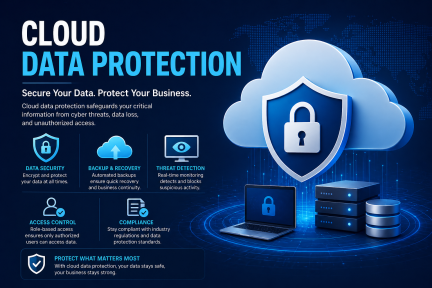
A modern cloud data protection system uses multiple layers to secure data.
1. Data Encryption
Data is encrypted both in transit and at rest, ensuring unauthorized users cannot access it.
2. Access Control
Only authorized users can access sensitive data through role-based permissions.
3. Backup and Recovery
Regular backups ensure data can be restored in case of loss or ransomware attacks.
4. Monitoring and Threat Detection
AI-driven tools detect suspicious activities in real time.
This multi-layered approach makes cloud data protection highly effective against evolving threats.
How Cloud Data Protection Secures the Data Lifecycle
Cloud data rarely remains in one location. It may be created by an application, stored in a database, copied to analytics platforms, shared with employees, transferred to SaaS services, backed up, archived, and eventually deleted.
Cloud data protection should therefore secure information throughout its lifecycle.
1. Data Creation
Identify sensitive information when it is created or collected.
2. Data Storage
Protect databases, object storage, SaaS platforms, backups, and other repositories with encryption and appropriate access controls.
3. Data Use
Limit access according to identity, role, device, application, and business need.
4. Data Sharing
Apply policies to prevent confidential information from being shared with unauthorized users or applications.
5. Data Transfer
Protect information in transit using secure protocols and encryption.
6. Data Backup and Recovery
Maintain protected recovery copies so critical information can be restored after deletion, corruption, ransomware, or service disruption.
7. Data Retention and Deletion
Retain information according to business and regulatory requirements and securely remove it when it is no longer required.
Lifecycle-based protection reduces security gaps created when data moves between users, applications, and cloud platforms.
Key Features of Cloud Data Protection Solutions
When choosing a cloud data protection solution, look for these essential features:
End-to-End Encryption
Protects data from unauthorized access at all stages.
AI-Based Threat Detection
Identifies unusual behavior and prevents cyberattacks.
Automated Backups
Ensures continuous data availability.
Multi-Cloud Support
Protects data across multiple cloud platforms.
Centralized Management
Allows easy monitoring and control from a single dashboard.
These features ensure your cloud data protection strategy is robust and scalable.
Data at Rest vs. Data in Transit vs. Data in Use
Cloud data can exist in three broad states.
Data at Rest
Data at rest is stored rather than actively moving between systems.
Examples include:
- Databases
- Cloud storage
- Backups
- Data lakes
- Virtual disks
Encryption and access control are important safeguards for data at rest.
Data in Transit
Data in transit moves between systems or locations.
Examples include:
- Browser-to-cloud traffic
- API communication
- Application-to-database connections
- Data transfers between cloud regions
Secure communication protocols and encryption help protect information while it travels.
Data in Use
Data in use is actively being processed by an application or system.
Protecting it may involve:
- Strong identity controls
- Application security
- Workload isolation
- Least privilege
- Runtime monitoring
- Data masking or other specialized techniques
A comprehensive cloud data protection strategy considers all three states.
What Is Data Security Posture Management (DSPM)?
Data Security Posture Management, or DSPM, helps organizations discover, classify, and assess sensitive data across cloud and multi-cloud environments.
Instead of focusing only on infrastructure, DSPM focuses on the data itself.
A DSPM capability can help security teams answer questions such as:
- Where is sensitive data stored?
- Which data is publicly exposed?
- Who can access it?
- Are users overprivileged?
- Is sensitive information encrypted?
- Where has confidential data been copied?
- Are cloud configurations exposing important information?
- Does shadow data exist outside approved repositories?
- Which data exposures create the greatest business risk?
DSPM is increasingly important because cloud environments change constantly. New databases, storage buckets, snapshots, applications, and data copies can appear faster than security teams can manually track them.
Continuous data discovery and classification help organizations identify these exposures before they develop into larger security incidents.
Types of Cloud Data Protection
Understanding different approaches helps you choose the right cloud data protection solution.
1. Backup as a Service (BaaS)
Automatically backs up data to secure cloud storage.
2. Disaster Recovery as a Service (DRaaS)
Provides full system recovery after an incident.
3. Encryption Services
Protects sensitive data through advanced encryption methods.
4. Identity and Access Management (IAM)
Controls who can access cloud resources.
Each type of cloud data protection serves a unique purpose in securing your data.
What Is Shadow Data in Cloud Environments?
Shadow data is information stored, copied, or created outside an organization’s expected or actively managed data repositories.
Examples may include:
- Forgotten cloud storage buckets
- Old database snapshots
- Development copies of production databases
- Unmanaged SaaS applications
- Test environments containing real customer information
- Employee-created cloud storage
- Abandoned cloud resources
- Data copied into AI or analytics services
Shadow data creates risk because security teams may not know that the information exists, where it resides, or who can access it.
Organizations can reduce shadow data risk by combining automated discovery, data classification, cloud asset inventory, access reviews, retention policies, and continuous monitoring.
Benefits of Cloud Data Protection
Implementing cloud data protection offers several advantages:
- Reduced risk of data loss
- Faster recovery after cyberattacks
- Improved compliance with regulations
- Enhanced business continuity
- Better visibility and control over data
Organizations that invest in cloud data protection are better prepared for unexpected threats.
What Is Data Discovery and Classification?
You cannot adequately protect sensitive cloud information if you do not know where it exists.
Data discovery identifies information across cloud services, while data classification categorizes it according to sensitivity, business value, or regulatory requirements.
Organizations may classify:
- Personally identifiable information
- Financial records
- Payment data
- Health information
- Credentials
- Source code
- Intellectual property
- Customer information
- Business-sensitive documents
Microsoft recommends maintaining an inventory of sensitive data and using discovery, classification, and labeling to establish appropriate security and privacy controls.
Why Classification Matters
Classification helps organizations determine:
- Who should access information
- Whether encryption is required
- Whether sharing should be restricted
- How long information should be retained
- Which DLP policies should apply
- Which compliance requirements matter
What Is DLP in Cloud Data Protection?
Data Loss Prevention (DLP) helps identify and control sensitive information to reduce unauthorized disclosure, transfer, or sharing.
Cloud DLP can help organizations detect or restrict activities such as:
- Uploading sensitive files to unauthorized services
- Sharing confidential documents publicly
- Copying regulated information to unmanaged locations
- Sending sensitive information to unauthorized recipients
- Moving protected information through risky applications
Microsoft’s current DLP platform, for example, focuses on discovering and protecting sensitive information across Microsoft 365, endpoints, browsers, networks, and AI applications while centrally enforcing policies.
DLP works best when it is connected to accurate data classification and business context rather than relying only on broad blocking rules.
Why Data Classification Matters for Cloud Protection
Not every piece of business data requires the same level of protection.
Data classification helps organizations categorize information according to its sensitivity, value, regulatory requirements, and potential impact if exposed.
A simple classification model may include:
| Classification | Example | Typical Protection |
|---|---|---|
| Public | Published marketing material | Basic integrity controls |
| Internal | Internal procedures | Authenticated access |
| Confidential | Contracts and financial records | Encryption and restricted access |
| Restricted | Credentials, customer records, regulated data | Strong encryption, strict least privilege, monitoring and DLP |
Classification allows organizations to apply stronger controls to their most sensitive information instead of treating all cloud data identically.
Cloud Encryption and Key Management
Encryption is one of the core controls for cloud data protection.
However, encryption is only as useful as the processes used to manage access and cryptographic keys.
Organizations should consider:
- Who controls encryption keys?
- Where are keys stored?
- Who can use them?
- How are keys rotated?
- Are keys separated from encrypted data?
- What happens when employees leave?
- Are key-management activities logged?
- How are compromised keys revoked?
Depending on business and compliance requirements, organizations may evaluate provider-managed keys, customer-managed keys, or other key-control models.
Strong key management prevents encryption from becoming a checkbox rather than an effective security control.
Cloud Encryption and Key Management
Encryption is one of the core controls for cloud data protection.
However, encryption is only as useful as the processes used to manage access and cryptographic keys.
Organizations should consider:
- Who controls encryption keys?
- Where are keys stored?
- Who can use them?
- How are keys rotated?
- Are keys separated from encrypted data?
- What happens when employees leave?
- Are key-management activities logged?
- How are compromised keys revoked?
Depending on business and compliance requirements, organizations may evaluate provider-managed keys, customer-managed keys, or other key-control models.
Strong key management prevents encryption from becoming a checkbox rather than an effective security control.
Cloud Data Protection vs. Cloud Backup
Another strong snippet opportunity:
Cloud backup and cloud data protection are not the same thing.
Cloud backup creates recoverable copies of information.
Cloud data protection is broader and includes:
- Discovery
- Classification
- Access control
- Encryption
- DLP
- Monitoring
- Backup
- Recovery
- Retention
- Incident response
Backups help restore data after an incident, but they do not by themselves prevent unauthorized users from accessing or stealing sensitive information.
Cloud Data Protection Against Ransomware
Cloud adoption does not eliminate ransomware risk.
Attackers who compromise identities or connected endpoints may attempt to:
- Delete cloud files
- Encrypt synchronized information
- Steal sensitive data
- Delete backups
- Modify retention settings
- Compromise administrator accounts
Organizations can strengthen ransomware resilience through:
- MFA for privileged accounts.
- Least-privilege access.
- Separate backup permissions.
- Immutable or protected backups where appropriate.
- Versioning.
- Recovery testing.
- Endpoint detection and response.
- Identity monitoring.
- Logging and alerting.
- Incident-response playbooks.
The goal is not only to prevent ransomware but also to ensure that the organization can recover trusted data after an attack.
What Is the Cloud Shared Responsibility Model?
This section should be added prominently because it is one of the largest weaknesses in the current page.
Cloud providers and customers share security responsibilities.
AWS describes this as security “of” the cloud versus security “in” the cloud. AWS protects its underlying infrastructure, while customers retain responsibilities that vary according to the services they use—including responsibilities involving data, permissions, configuration, and encryption choices.
Cloud Provider Responsibilities May Include
- Physical data centers
- Underlying infrastructure
- Hardware
- Core networking
- Foundational cloud services
Customer Responsibilities May Include
- Data
- User identities
- Access permissions
- Cloud configurations
- Applications
- Encryption choices
- Security policies
- Data classification
The exact division depends on the cloud service and deployment model.
Moving data to the cloud does not transfer all responsibility for protecting that data to the cloud provider.
Common Cloud Data Protection Threats
1. Cloud Misconfiguration
Incorrect permissions can expose sensitive information.
AWS specifically identifies misconfiguration risks such as unintended public access, excessive permissions, and unencrypted records, and recommends monitoring and remediation controls.
2. Compromised Credentials
Stolen credentials may allow attackers to access cloud services without deploying traditional malware.
3. Excessive Permissions
Users and applications may accumulate permissions they no longer require.
4. Insider Risk
Authorized users can intentionally or accidentally expose sensitive information.
5. Ransomware
Attackers may target connected cloud information and backups.
6. Data Leakage
Information may be exposed through incorrect sharing settings, unmanaged applications, or human error.
7. Insecure APIs
Poorly protected APIs can expose cloud data and services.
8. Shadow IT
Employees may store sensitive information in cloud services that security teams do not know about.
Best Practices for Cloud Data Protection
To maximize your cloud data protection, follow these best practices:
✔ Encrypt Sensitive Data
Always encrypt critical data to prevent unauthorized access.
✔ Implement Strong Access Controls
Use role-based access and multi-factor authentication.
✔ Regularly Backup Data
Ensure backups are automated and stored securely.
✔ Monitor Cloud Activity
Detect threats early with continuous monitoring.
✔ Train Employees
Human error is a leading cause of data breaches.
These steps strengthen your cloud data protection strategy.
CASB vs. DLP vs. DSPM
This comparison can strengthen topical depth.
| Technology | Primary Purpose |
|---|---|
| DLP | Prevent inappropriate movement or disclosure of sensitive data |
| CASB | Provide visibility and policy controls for cloud-service usage |
| DSPM | Discover sensitive cloud data and identify data-centric risks |
| IAM | Control identities and permissions |
| CSPM | Identify cloud configuration and posture risks |
| Backup/Recovery | Restore data after loss or disruption |
These technologies solve different parts of the cloud data protection problem and may overlap in modern security platforms.
Encryption and Key Management for Cloud Data
Encryption protects information by converting readable data into a form that cannot be understood without the appropriate cryptographic key.
Cloud data should be evaluated across three states:
Data at Rest
Protect information stored in databases, object storage, virtual disks, backups, and archives.
Data in Transit
Encrypt information while it travels between users, applications, APIs, networks, and cloud services.
Data in Use
For highly sensitive workloads, organizations may also evaluate technologies designed to reduce exposure while information is actively being processed.
Encryption is only as strong as the protection of its keys. Organizations should therefore establish clear key-management practices, including access controls, key rotation, lifecycle management, separation of duties, and auditing.
Security teams should also determine when provider-managed keys are sufficient and when business or compliance requirements call for greater customer control over encryption keys.
Identity, Least Privilege, and Zero Trust
Many cloud data breaches begin with compromised identities, excessive permissions, or insecure access rather than a failure of encryption.
A strong cloud data protection strategy should enforce:
- Multi-factor authentication
- Least-privilege access
- Role-based or attribute-based permissions
- Privileged access management
- Regular entitlement reviews
- Removal of unused accounts
- Short-lived credentials where appropriate
- Continuous authentication and risk evaluation
- Logging of sensitive data access
Zero Trust strengthens this approach by avoiding automatic trust based simply on a user’s location or network connection.
Every access request should be evaluated according to identity, authorization, context, device security, and the sensitivity of the requested resource.
Common Challenges in Cloud Data Protection
Despite its benefits, cloud data protection comes with challenges:
- Misconfigured cloud settings
- Lack of visibility across environments
- Data compliance complexities
- Insider threats
- Integration with existing systems
Addressing these challenges is key to effective cloud data protection.
How to Choose the Right Cloud Data Protection Solution
Selecting the right cloud data protection solution is crucial.
Consider These Factors:
- Scalability: Can it grow with your business?
- Ease of use: Is it user-friendly?
- Security features: Does it offer advanced protection?
- Compliance support: Does it meet regulatory requirements?
- Vendor reliability: Is the provider trustworthy?
A well-chosen cloud data protection solution ensures long-term security.
Cloud Backup, Ransomware Protection, and Data Recovery
Cloud availability should not be confused with complete data recoverability.
Organizations need a recovery strategy for incidents such as:
- Accidental deletion
- Ransomware
- Malicious insiders
- Application errors
- Data corruption
- Account compromise
- Configuration mistakes
- Service disruption
A resilient cloud backup strategy should consider:
- Automated backups
- Immutable or tamper-resistant recovery copies
- Version history
- Appropriate retention periods
- Separation between production and backup access
- Encryption
- Recovery Point Objectives (RPOs)
- Recovery Time Objectives (RTOs)
- Regular restoration testing
A backup that has never been tested should not automatically be assumed to be recoverable.
Organizations should regularly simulate restoration scenarios to confirm that critical business data can be recovered within required timeframes.
Cloud Data Protection and Zero Trust
Zero Trust strengthens cloud data protection by removing assumptions of implicit trust.
Core practices include:
- Verify users explicitly.
- Authenticate strongly.
- Apply least privilege.
- Evaluate device security.
- Monitor sessions.
- Protect privileged access.
- Segment sensitive resources.
- Continuously reassess risk.
Instead of assuming a user should retain access simply because they successfully logged in, organizations should continuously evaluate whether access remains appropriate.
Cloud Data Protection Compliance
Cloud data protection may also support requirements arising from:
- GDPR
- HIPAA
- PCI DSS
- Industry standards
- Contractual requirements
- Regional privacy requirements
Cloud Data Protection vs Cloud Security
Cloud data protection and cloud security overlap, but they are not identical.
| Cloud Data Protection | Cloud Security |
|---|---|
| Focuses primarily on information | Protects the broader cloud environment |
| Data discovery and classification | Infrastructure configuration |
| Encryption | Network security |
| DLP | Workload protection |
| Backup and recovery | Vulnerability management |
| Data access governance | Identity security |
| Retention and deletion | Threat detection |
| Data exposure monitoring | Cloud posture management |
Cloud data protection should therefore be treated as a critical component of a broader cloud security strategy.
DSPM vs CSPM vs DLP: What’s the Difference?
| Technology | Primary Focus | Key Question |
|---|---|---|
| DSPM | Sensitive data and its exposure | Where is sensitive data, and who can reach it? |
| CSPM | Cloud configurations and infrastructure posture | Is cloud infrastructure securely configured? |
| DLP | Data movement and policy enforcement | Is sensitive data being transferred or shared improperly? |
| IAM | Identity and permissions | Who should be allowed to access the resource? |
| Backup & Recovery | Data resilience | Can the information be restored after loss or attack? |
These technologies solve different problems and work best as complementary layers of a broader cloud data protection architecture.
Future of Cloud Data Protection
The future of cloud data protection is evolving rapidly with:
- AI-driven security automation
- Zero Trust security models
- Cloud-native security platforms
- Advanced threat intelligence
Businesses must stay updated to maintain strong cloud data protection.
Conclusion
As cyber threats continue to grow, investing in cloud data protection is no longer optional—it’s essential. From safeguarding sensitive data to ensuring business continuity, it plays a critical role in modern cybersecurity.
By implementing the right strategies and tools, your organization can stay secure, compliant, and resilient.
Get Started with Advanced Protection Today
Secure your business with powerful cybersecurity solutions.
👉 Register now: https://openedr.platform.xcitium.com/register/
FAQs About Cloud Data Protection
1. What is cloud data protection?
Cloud data protection involves securing data stored in cloud environments from unauthorized access, loss, or breaches.
2. Why is cloud data protection important?
It prevents data loss, protects against cyber threats, and ensures compliance with regulations.
3. How does cloud data protection work?
It uses encryption, access control, backups, and monitoring to secure data.
4. What are the best tools for cloud data protection?
Tools include backup solutions, encryption services, and endpoint protection platforms.
5. Can small businesses benefit from cloud data protection?
Yes, it helps small businesses secure data and avoid costly cyberattacks.

 Loading...