Updated on July 3, 2026, by OpenEDR
Email remains the backbone of business communication, but it is also one of the biggest targets for cybercriminals. Every day, organizations face phishing attacks, business email compromise (BEC), ransomware delivery, malware infections, and data theft through email. Implementing network solutions email security is no longer optional—it is a critical part of protecting your business, employees, and customers.
Modern network solutions email strategies combine advanced email security, endpoint protection, Zero Trust principles, artificial intelligence (AI), and continuous monitoring to stop cyber threats before they reach users. Whether you’re an IT manager, cybersecurity professional, CEO, or business owner, understanding how to secure your email infrastructure can significantly reduce cyber risk while improving productivity.
In this guide, you’ll learn how network solutions email security works, why it matters, the technologies involved, and best practices for protecting modern organizations.
What Is Network Solutions Email?
Network solutions email refers to the technologies, security controls, and management practices used to protect business email systems from cyber threats while ensuring reliable communication.
A comprehensive network solutions email strategy protects:
- Email servers
- User inboxes
- Email gateways
- Cloud email platforms
- Mobile devices
- Remote employees
- Business communications
- Sensitive information
Rather than relying on spam filtering alone, modern email security combines multiple layers of protection that work together to stop increasingly sophisticated attacks.
Why Network Solutions Email Security Matters
Cybercriminals continue to target email because it offers one of the easiest ways to gain access to business networks.
Without proper email security, organizations risk:
- Phishing attacks
- Malware infections
- Ransomware delivery
- Business Email Compromise (BEC)
- Credential theft
- Data breaches
- Financial fraud
- Regulatory violations
Strong network solutions email security reduces these risks while improving employee confidence and business resilience.
Common Email Threats Facing Businesses
Understanding today’s threats helps organizations build stronger defenses.
Phishing Attacks
Phishing emails trick employees into clicking malicious links or revealing sensitive information.
Common phishing tactics include:
- Fake invoices
- Password reset requests
- Delivery notifications
- Executive impersonation
- Fake cloud sharing invitations
Even a single successful phishing attack can lead to a major security incident.
Business Email Compromise (BEC)
BEC attacks involve criminals impersonating trusted executives, suppliers, or business partners.
These attacks often aim to:
- Steal money
- Redirect payments
- Obtain confidential information
- Gain access to business systems
Unlike traditional phishing, BEC attacks often contain no malware, making them harder to detect.
Malware and Ransomware
Email remains one of the most common delivery methods for malware.
Attackers distribute:
- Ransomware
- Trojans
- Spyware
- Remote Access Trojans (RATs)
- Keyloggers
- Fileless malware
Advanced email security solutions inspect attachments and links before users can interact with them.
Spam and Unwanted Messages
Although spam may seem harmless, it often serves as the first stage of larger cyberattacks.
Effective filtering reduces distractions while blocking potentially dangerous content.
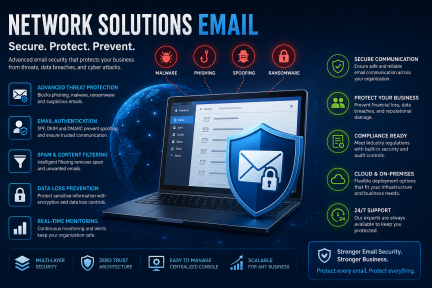
Essential Components of Network Solutions Email Security
Protecting business email requires multiple security layers.
Secure Email Gateway
A Secure Email Gateway (SEG) analyzes incoming and outgoing email.
Key capabilities include:
- Spam filtering
- Malware scanning
- URL inspection
- Attachment analysis
- Reputation filtering
- Content inspection
It serves as the organization’s first line of defense.
Email Authentication
Authentication technologies help prevent spoofing and impersonation attacks.
Important standards include:
- SPF (Sender Policy Framework)
- DKIM (DomainKeys Identified Mail)
- DMARC (Domain-based Message Authentication, Reporting and Conformance)
Together, these standards verify that emails originate from legitimate senders.
Endpoint Protection
Even if a malicious email reaches an inbox, endpoint security can prevent malware from executing.
Modern endpoint protection includes:
- Behavioral analysis
- AI-powered detection
- Anti-ransomware protection
- Automated threat response
Endpoint security complements email protection by securing user devices.
Multi-Factor Authentication (MFA)
Passwords alone are no longer enough.
MFA requires users to verify their identity using multiple authentication factors, making stolen credentials far less useful to attackers.
Zero Trust Security
Zero Trust follows one principle:
Never Trust, Always Verify.
Every email interaction, user, and device is continuously evaluated before access is granted.
How Network Solutions Email Security Works
Modern email security follows a layered approach.
Step 1: Receive Incoming Email
Every incoming message is inspected before delivery.
Step 2: Verify the Sender
Authentication protocols confirm whether the sender is legitimate.
Step 3: Analyze Attachments
Files are scanned using signatures, behavioral analysis, and sandboxing.
Step 4: Inspect URLs
Embedded links are checked against threat intelligence databases.
Step 5: Detect Suspicious Behavior
AI identifies unusual language, spoofing attempts, and phishing indicators.
Step 6: Block Threats
Malicious messages are quarantined or rejected automatically.
Step 7: Protect Endpoints
If malicious content reaches a user, endpoint protection prevents execution.
Step 8: Continuous Monitoring
Security teams receive alerts and investigate suspicious activity in real time.
Key Features of Modern Network Solutions Email Platforms
When evaluating email security, look for these capabilities:
- AI-powered phishing detection
- Real-time malware scanning
- Sandboxing for attachments
- URL rewriting and inspection
- Business Email Compromise detection
- Data Loss Prevention (DLP)
- Multi-Factor Authentication support
- Email encryption
- Threat intelligence integration
- Cloud email protection
- Security reporting
- Automated incident response
A comprehensive platform combines these features into a centralized security solution.
Benefits of Network Solutions Email Security
Organizations implementing advanced email protection gain several advantages.
Improved Threat Detection
AI and behavioral analytics detect attacks that traditional filters may miss.
Better Business Continuity
Blocking ransomware and malware reduces operational disruption.
Enhanced Regulatory Compliance
Strong email security supports compliance with regulations such as:
- GDPR
- HIPAA
- PCI DSS
- ISO 27001
- SOC 2
Reduced Financial Risk
Preventing BEC attacks and phishing scams protects organizational finances.
Increased Employee Productivity
Employees spend less time managing spam and suspicious emails.
Stronger Customer Trust
Protecting communications strengthens confidence in your organization.
Best Practices for Securing Business Email
To maximize protection:
- Enable Multi-Factor Authentication.
- Configure SPF, DKIM, and DMARC.
- Deploy advanced endpoint protection.
- Use a secure email gateway.
- Train employees to recognize phishing.
- Update software regularly.
- Encrypt sensitive communications.
- Monitor email activity continuously.
- Back up critical email data.
- Adopt a Zero Trust security model.
These best practices create multiple layers of defense against evolving threats.
Industry Use Cases
Healthcare
Protect patient communications and comply with HIPAA requirements.
Financial Services
Prevent fraud, account compromise, and payment redirection attacks.
Manufacturing
Secure communications across distributed operations and supply chains.
Retail
Protect customer information, online transactions, and vendor communications.
Government
Secure sensitive communications and protect public sector infrastructure.
Education
Safeguard student records, faculty communications, and research data.
Emerging Trends in Email Security
The email threat landscape continues to evolve.
Key trends include:
- AI-driven phishing detection
- Cloud-native email security
- Zero Trust email access
- Integrated XDR platforms
- Automated threat hunting
- Identity-based protection
- Secure collaboration tools
- Predictive threat intelligence
Organizations adopting these technologies will be better prepared for future attacks.
Conclusion
Email remains one of the most valuable communication tools—and one of the most targeted attack vectors. Implementing a comprehensive network solutions email strategy helps organizations defend against phishing, ransomware, malware, and business email compromise while improving compliance and business continuity.
By combining secure email gateways, endpoint protection, Zero Trust principles, AI-powered threat detection, and employee awareness, businesses can significantly reduce cyber risk and build a more resilient security posture.
Ready to strengthen your organization’s email security?
Start protecting your business today with a modern cybersecurity platform:
https://openedr.platform.xcitium.com/register/
Frequently Asked Questions
1. What is network solutions email security?
Network solutions email security combines technologies such as email filtering, authentication, encryption, endpoint protection, and threat detection to protect business email communications from cyber threats.
2. How does email security prevent phishing attacks?
Email security analyzes sender identity, attachments, links, and message behavior using AI, reputation services, and authentication protocols to block phishing emails before they reach users.
3. What technologies are essential for securing business email?
Key technologies include Secure Email Gateways (SEG), SPF, DKIM, DMARC, Multi-Factor Authentication (MFA), endpoint protection, Data Loss Prevention (DLP), encryption, and Zero Trust security.
4. Why is Multi-Factor Authentication important for email?
MFA adds an extra layer of protection by requiring users to verify their identity with more than just a password, helping prevent unauthorized access even if credentials are stolen.
5. How can businesses improve their email security?
Businesses should deploy advanced email filtering, enable email authentication standards, train employees against phishing, implement endpoint protection, adopt Zero Trust security, and continuously monitor email activity for suspicious behavior.

 Loading...