
Updated on August 27, 2026, by OpenEDR
What would your business do if a cyberattack hit right now? Every organization—big or small—faces this risk daily. That’s why having a strong security incident response strategy is no longer optional. It’s essential.
Cyber incidents can lead to data breaches, financial loss, and downtime. But with the right security incident response plan, you can quickly detect threats, contain damage, and recover operations.
In this guide, we’ll break down everything you need to know about security incident response, from key steps to best practices and tools.
What is Security Incident Response?
Security incident response is the process of identifying, managing, and mitigating cybersecurity incidents. These incidents can include malware attacks, data breaches, ransomware, or unauthorized access.
The goal of security incident response is to:
- Detect threats quickly
- Minimize damage
- Restore normal operations
- Prevent future incidents
A well-defined security incident response plan ensures your organization can react effectively when threats occur.
Why Security Incident Response is Critical
Cyberattacks are increasing in frequency and complexity. Without proper security incident response, businesses struggle to recover.
Key reasons it matters:
- Reduces downtime during cyber incidents
- Protects sensitive data from breaches
- Minimizes financial loss
- Ensures regulatory compliance
- Improves overall cybersecurity posture
Organizations with strong security incident response capabilities recover faster and suffer less damage.
Security Event vs. Alert vs. Incident vs. Data Breach
These terms are often confused.
| Term | Meaning | Example |
|---|---|---|
| Security Event | An observable activity within a system | User logs into an application |
| Security Alert | A security tool flags activity for review | EDR detects suspicious PowerShell |
| Security Incident | Activity that threatens security or violates policy | Compromised account accesses sensitive systems |
| Data Breach | Unauthorized exposure, access, or disclosure of protected data | Attacker steals customer records |
Not every security alert becomes an incident.
Likewise, not every cybersecurity incident necessarily results in a confirmed data breach.
Accurate classification helps security teams prioritize resources and avoid unnecessary escalation.
Who Should Be on a Security Incident Response Team?
Security incident response is not solely an IT responsibility.
Depending on incident severity, the response team may include:
| Role | Primary Responsibility |
|---|---|
| Incident Commander | Coordinates the overall response and major decisions |
| SOC/Security Analysts | Detect and investigate suspicious activity |
| Incident Responders | Contain, investigate, and remediate threats |
| IT Operations | Restore infrastructure and services |
| Identity Team | Secures compromised accounts and privileges |
| Cloud Team | Investigates affected cloud resources |
| Legal Counsel | Advises on legal obligations and evidence |
| Privacy/Compliance | Evaluates regulatory and data-breach requirements |
| Communications/PR | Coordinates approved external communications |
| HR | Supports employee-related or insider incidents |
| Executive Leadership | Makes major business and risk decisions |
Organizations should define these responsibilities before an emergency. Trying to decide who owns each decision during an active ransomware attack wastes valuable response time.
Security Incident Response vs. Incident Management
Although the terms are sometimes used interchangeably, they are not exactly the same.
| Security Incident Response | Incident Management |
|---|---|
| Focuses primarily on cybersecurity investigation and remediation | Coordinates the broader organizational response |
| Threat detection | Executive decision-making |
| Digital forensics | Legal and regulatory actions |
| Containment | Customer and stakeholder communication |
| Malware removal | Business continuity |
| Technical recovery | HR, legal, privacy, and PR coordination |
A major cyberattack requires both.
Technical teams may successfully remove malware, but the organization still needs to manage business disruption, legal obligations, affected customers, regulators, employees, and other stakeholders.
Short-Term vs. Long-Term Containment
Short-Term Containment
Immediate measures intended to stop active damage.
Examples:
- Isolate infected laptop.
- Disable compromised account.
- Block malicious domain.
- Revoke stolen access token.
Long-Term Containment
Measures that allow investigation and business operations to continue safely.
Examples:
- Move affected workloads to segmented networks.
- Apply temporary security controls.
- Increase monitoring.
- Replace compromised credentials.
- Restrict administrative access.
Document every major containment action and its timestamp.
How to Classify Security Incident Severity
Not every security alert should receive the same response priority.
Organizations should define severity levels before incidents occur.
| Severity | Example | Typical Response |
|---|---|---|
| Critical / SEV-1 | Active ransomware, widespread breach, critical-system compromise | Immediate executive and incident response activation |
| High / SEV-2 | Confirmed endpoint compromise or privileged-account takeover | Rapid investigation and containment |
| Medium / SEV-3 | Limited malware infection or suspicious unauthorized activity | Prioritized investigation |
| Low / SEV-4 | Low-risk policy violation or contained suspicious activity | Standard security workflow |
Severity should consider more than the technical nature of an attack.
Evaluate:
- Number of affected systems
- Sensitivity of exposed data
- Privilege level of compromised accounts
- Business-critical services affected
- Operational disruption
- Attacker’s persistence
- Regulatory implications
- Customer impact
- Potential financial loss
- Likelihood of further spread
A consistent classification model helps teams prioritize resources and escalate serious incidents without unnecessary delay.
Phishing Incident Response
When a phishing message is reported:
- Preserve the original email.
- Analyze sender information.
- Inspect URLs and attachments safely.
- Identify other recipients.
- Remove malicious messages.
- Block malicious indicators.
- Determine whether anyone clicked.
- Check whether credentials were submitted.
- Reset compromised credentials.
- Review authentication activity.
The response changes significantly once a phishing email progresses to credential compromise.
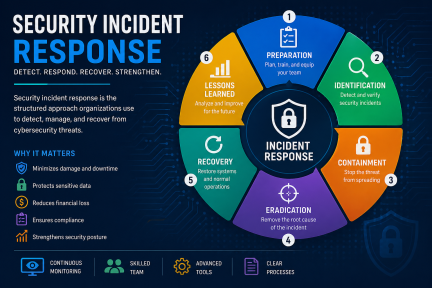
The 6 Phases of Security Incident Response
A structured security incident response framework helps organizations manage incidents efficiently.
1. Preparation
Preparation is the foundation of security incident response.
- Develop an incident response plan
- Train employees and IT teams
- Deploy security tools (EDR, SIEM)
- Define roles and responsibilities
2. Identification
This phase involves detecting and confirming an incident.
- Monitor alerts and logs
- Identify unusual behavior
- Validate threats
➡ Early detection is critical for effective security incident response.
3. Containment
Once an incident is identified, it must be contained.
- Isolate affected systems
- Disable compromised accounts
- Block malicious traffic
➡ Containment prevents the threat from spreading further.
4. Eradication
Remove the root cause of the incident.
- Delete malware
- Patch vulnerabilities
- Remove unauthorized access
➡ This ensures the threat is fully eliminated.
5. Recovery
Restore systems and operations.
- Recover data from backups
- Rebuild systems if necessary
- Monitor for reinfection
➡ Recovery ensures business continuity.
6. Lessons Learned
Analyze the incident to improve future response.
- Conduct post-incident review
- Update response plans
- Strengthen defenses
➡ Continuous improvement enhances security incident response.
Key Components of an Effective Security Incident Response Plan
A strong security incident response plan includes:
Incident Detection Tools
Use tools like SIEM, EDR, and threat intelligence platforms.
Defined Roles and Responsibilities
Assign clear roles for faster decision-making.
Communication Plan
Ensure internal and external communication during incidents.
Documentation
Record all actions for compliance and analysis.
Continuous Monitoring
Monitor systems to detect threats in real time.
What Is a Security Incident Response Playbook?
An incident response playbook is a predefined set of actions for handling a specific type of cybersecurity incident.
Instead of forcing responders to improvise under pressure, playbooks provide repeatable steps for investigation, containment, escalation, communication, and recovery.
Organizations should consider creating playbooks for:
- Ransomware
- Phishing
- Business email compromise
- Malware infection
- Compromised credentials
- Privileged-account compromise
- Data exfiltration
- Cloud account compromise
- Insider threats
- Lost or stolen devices
- Web application attacks
- Supply-chain compromise
Each playbook should define triggers, owners, investigation steps, containment actions, escalation criteria, communication requirements, evidence requirements, and recovery procedures.
Playbooks should be tested and updated as technologies, business processes, and attacker techniques change.
SIEM vs. EDR vs. XDR vs. SOAR in Incident Response
The existing OpenEDR page lists these tools but does not explain their different roles in enough detail.
| Technology | Incident Response Role |
|---|---|
| SIEM | Centralizes and correlates logs |
| EDR | Detects and investigates endpoint activity |
| XDR | Correlates threats across multiple security domains |
| SOAR | Orchestrates and automates response workflows |
| Threat Intelligence | Adds external threat context |
| Forensic Tools | Preserve and analyze evidence |
These technologies complement one another rather than serving as direct substitutes.
Common Types of Security Incidents
Understanding threats helps improve security incident response.
- Ransomware attacks
- Phishing attacks
- Data breaches
- Insider threats
- DDoS attacks
Each type requires a tailored security incident response approach.
How to Test a Security Incident Response Plan
A plan that has never been tested is an assumption.
Organizations should conduct:
Tabletop Exercises
Teams discuss how they would respond to a simulated incident.
Technical Simulations
Security teams practice actual detection, investigation, and containment.
Red-Team Exercises
Authorized testers simulate attacker techniques.
Recovery Exercises
Teams verify whether critical systems can actually be restored.
CISA recommends exercises and regular plan review as part of incident-response preparation.
How to Respond to a Ransomware Incident
When ransomware is suspected:
- Activate the incident response process.
- Isolate affected systems to limit additional spread.
- Identify compromised identities and restrict unauthorized access.
- Preserve relevant evidence before making unnecessary destructive changes.
- Determine the scope across endpoints, servers, cloud systems, identities, and backups.
- Identify persistence and initial access where possible.
- Remove malicious access and artifacts.
- Patch exploited vulnerabilities and correct insecure configurations.
- Rotate compromised credentials, tokens, and keys.
- Validate backups before restoration.
- Restore systems in a controlled manner.
- Monitor for attacker re-entry.
- Complete required legal, regulatory, insurance, and stakeholder processes.
- Conduct a post-incident review.
Avoid restoring systems before understanding how the attacker gained access. Otherwise, the same weakness may allow reinfection or renewed compromise.
Best Practices for Security Incident Response
To improve your security incident response, follow these best practices:
Develop a Clear Plan
Document procedures and update regularly.
Train Your Team
Ensure employees know how to respond to incidents.
Use Advanced Security Tools
Deploy endpoint protection, EDR, and monitoring solutions.
Automate Where Possible
Automation speeds up detection and response.
Test Your Plan
Run simulations to identify gaps.
Preserve Evidence During Security Incident Response
Fast containment is important, but responders should also consider what evidence may be required for investigation, legal review, insurance, regulatory reporting, or law enforcement.
Potential evidence includes:
- Endpoint telemetry
- Authentication logs
- Cloud audit logs
- Network logs
- Email records
- Firewall logs
- EDR alerts
- Suspicious files
- Memory captures
- Disk images
- Malware samples
- Account activity
- Relevant timestamps
Document significant response actions and maintain appropriate chain-of-custody procedures when formal forensic evidence may be required.
Do not unnecessarily delete logs, wipe systems, or destroy suspicious files before determining whether they are needed for investigation.
Security Incident Response Metrics
The existing page should add measurable outcomes.
| Metric | Meaning |
|---|---|
| MTTD | Mean Time to Detect |
| MTTA | Mean Time to Acknowledge |
| MTTC | Mean Time to Contain |
| MTTR | Mean Time to Respond/Recover |
| Dwell Time | Time attacker remains undetected |
| Recurrence Rate | Repeated incidents |
| Escalation Rate | Incidents requiring higher-level response |
| False Positive Rate | Alerts incorrectly classified |
| Recovery Time | Time to restore business operations |
Do not optimize only for speed.
Also measure accuracy, containment effectiveness, business impact, recurrence, and control improvements.
Challenges in Security Incident Response
Despite its importance, security incident response comes with challenges:
- Lack of skilled cybersecurity professionals
- Slow detection of threats
- Complex IT environments
- Limited visibility across systems
- Increasing sophistication of attacks
Addressing these challenges is key to improving response effectiveness.
Preserve Evidence During Security Incident Response
Fast containment is important, but responders should also consider what evidence may be required for investigation, legal review, insurance, regulatory reporting, or law enforcement.
Potential evidence includes:
- Endpoint telemetry
- Authentication logs
- Cloud audit logs
- Network logs
- Email records
- Firewall logs
- EDR alerts
- Suspicious files
- Memory captures
- Disk images
- Malware samples
- Account activity
- Relevant timestamps
Document significant response actions and maintain appropriate chain-of-custody procedures when formal forensic evidence may be required.
Do not unnecessarily delete logs, wipe systems, or destroy suspicious files before determining whether they are needed for investigation.
Tools for Security Incident Response
Modern security incident response relies on advanced tools:
SIEM (Security Information and Event Management)
Aggregates and analyzes logs.
EDR (Endpoint Detection and Response)
Detects and responds to endpoint threats.
XDR (Extended Detection and Response)
Provides visibility across multiple systems.
SOAR (Security Orchestration, Automation, and Response)
Automates incident response workflows.
These tools enhance security incident response capabilities.
How to Build a Strong Security Incident Response Strategy
Follow these steps to strengthen your security incident response:
- Assess your current security posture
- Identify critical assets
- Define incident response procedures
- Implement monitoring tools
- Train employees regularly
- Review and improve continuously
A proactive approach ensures effective security incident response.
Security Incident Response Metrics to Track
Organizations should measure whether their incident response capability is actually improving.
Useful metrics include:
| Metric | What It Measures |
|---|---|
| Mean Time to Detect (MTTD) | How quickly an incident is discovered |
| Mean Time to Acknowledge (MTTA) | How quickly responders acknowledge an alert or incident |
| Mean Time to Contain (MTTC) | How quickly attacker activity is restricted |
| Mean Time to Remediate (MTTR) | How quickly the incident is remediated |
| Recovery Time | Time required to restore business operations |
| Incident Recurrence Rate | How often similar incidents return |
| Escalation Accuracy | Whether serious incidents reach the right teams |
| Playbook Effectiveness | Whether predefined procedures worked as intended |
Metrics should drive improvement rather than simply produce dashboards.
For example, a long containment time may reveal missing endpoint visibility, unclear decision authority, manual processes, or insufficient staffing.
Future Trends in Security Incident Response
The future of security incident response includes:
- AI-driven threat detection
- Automated response systems
- Zero Trust security models
- Cloud-native security solutions
Organizations must adapt to stay ahead of cyber threats.
Conclusion
Cyber threats are inevitable—but damage doesn’t have to be. A well-planned security incident response strategy enables businesses to detect, contain, and recover from attacks quickly.
By investing in the right tools, training, and processes, organizations can strengthen their defenses and ensure long-term security.
Strengthen Your Security Today
Protect your business with advanced threat detection and response tools.
👉 Register now: https://openedr.platform.xcitium.com/register/
FAQs About Security Incident Response
1. What is security incident response?
Security incident response is the process of identifying, managing, and resolving cybersecurity incidents to minimize damage.
2. What are the steps in incident response?
The main steps include preparation, identification, containment, eradication, recovery, and lessons learned.
3. Why is security incident response important?
It helps reduce damage, recover faster, and protect sensitive data during cyber incidents.
4. What tools are used for incident response?
Common tools include SIEM, EDR, XDR, and SOAR platforms.
5. How can businesses improve incident response?
By creating a plan, training staff, using advanced tools, and continuously improving processes.

 Loading...