
Updated on November 20, 2025, by OpenEDR
Have you ever wondered how companies protect their most sensitive information — customer data, financial records, intellectual property, and internal communications — from leaks or unauthorized access? With cyberattacks increasing and employees accessing corporate data from everywhere, protecting information has never been more important. And that’s exactly where DLP security steps in.
Whether you’re in cybersecurity, IT management, leadership, or part of a growing business, understanding DLP security can help you safeguard data, reduce risk, and build a stronger security culture.
In this simple, conversational guide, we’ll walk through what DLP security is, how it works, why it matters, and how you can use it to protect your organization in 2025.
Let’s break it down.
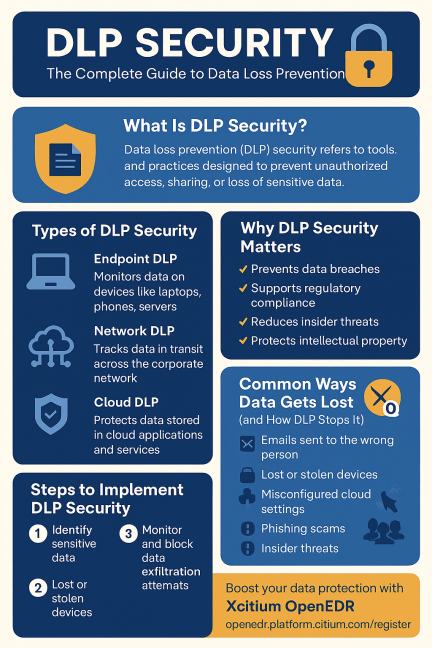
⭐ What Is DLP Security? (Simple Definition)
DLP security — or Data Loss Prevention security — refers to tools and processes that identify, monitor, and protect sensitive data from being:
Leaked
Lost
Stolen
Misused
Accidentally shared
DLP systems track sensitive data everywhere it lives:
On devices
On networks
In cloud storage
In emails
In SaaS apps
In endpoints
In internal systems
In simple terms:
👉 DLP security stops confidential information from going where it shouldn’t.
⭐ Why DLP Security Matters Today
Data has become one of the most valuable assets of any organization. And the risks have grown dramatically in recent years.
✔ Remote work expanded the attack surface
Employees now access sensitive data from home, on mobile devices, and in unmanaged environments.
✔ Cybercriminals target data
Ransomware, phishing, and insider threats all aim to access and steal data.
✔ Compliance is stricter
Regulations like GDPR, HIPAA, PCI-DSS, CCPA require businesses to control and protect sensitive information.
✔ Cloud adoption is exploding
More data is now stored or shared across cloud platforms, third-party apps, and SaaS tools.
✔ Insider threats are rising
Whether intentional or accidental, insiders expose more data than external hackers.
That’s why DLP security is essential for modern organizations of all sizes.
🔐 Types of Data DLP Security Helps Protect
DLP systems guard a wide range of sensitive information:
1. Personal Identifiable Information (PII)
Examples:
Names
Addresses
Social Security numbers
Phone numbers
Birthdates
2. Financial Information
Bank accounts
Credit card numbers
Tax details
3. Protected Health Information (PHI)
For healthcare and medical organizations.
4. Intellectual Property (IP)
Source code
Engineering designs
Patents
Trade secrets
5. Internal Business Data
Contracts
Strategy documents
Private communications
6. Credentials & Access Keys
Passwords
API keys
Tokens
Encryption keys
DLP security ensures sensitive data stays controlled, segmented, and protected.
⭐ How DLP Security Works (Simple Explanation)
DLP systems follow three core steps:
1. Identify Sensitive Data
DLP tools scan and classify data using:
Patterns (credit card numbers, SSNs)
Labels (confidential, internal, public)
Keywords
AI-based recognition
File types
2. Monitor Data Movement
DLP tracks how data is:
Accessed
Stored
Shared
Copied
Uploaded
Downloaded
Transferred
Printed
3. Protect Data
If behavior looks risky, the DLP system can:
Block transmission
Encrypt files
Alert administrators
Restrict access
Quarantine data
Apply compliance policies
In other words:
👉 DLP security is always watching and preventing data from leaving the organization.
⭐ Types of DLP Security
There are three major categories of DLP security solutions.
1. Endpoint DLP
Monitors data on endpoints such as:
Laptops
Desktops
Mobile phones
Servers
This prevents unauthorized data transfers via:
USB drives
Local storage
Printing
Screenshots
Clipboard
External apps
2. Network DLP
Monitors data moving across the company network.
This stops:
Unauthorized emails
File transfers
Cloud uploads
External sharing
3. Cloud DLP
Protects data stored in:
Google Workspace
Microsoft 365
Dropbox
Salesforce
AWS
SaaS platforms
Cloud DLP ensures data remains secure across all cloud channels.
⭐ DLP Security Use Cases for Businesses
Here’s how real organizations use DLP security:
✔ Preventing data leaks
DLP blocks confidential documents from being shared externally.
✔ Enforcing compliance
Helps organizations meet regulatory standards.
✔ Stopping insider threats
Monitors suspicious employee activity.
✔ Protecting intellectual property
Companies use DLP to secure trade secrets and proprietary data.
✔ Securing cloud applications
Controls data shared through SaaS platforms.
✔ Monitoring email communications
Prevents employees from emailing confidential information.
✔ Controlling removable media
Stops data exfiltration via USB or external drives.
🔥 DLP Security in Cybersecurity: Why It’s Critical
When employees or attackers move data, it creates massive risks.
DLP security reduces them significantly.
⭐ 1. Prevents Data Breaches
DLP blocks unauthorized access and sharing.
⭐ 2. Stops Malware and Ransomware Data Theft
Even if attackers breach your network, DLP prevents exfiltration.
⭐ 3. Mitigates Insider Threats
DLP alerts you to unusual employee behavior.
⭐ 4. Enhances Zero Trust Security
DLP supports least privilege policies and strict access controls.
⭐ 5. Reduces Human Error
Accidental sharing is one of the most common causes of data loss.
⭐ 6. Strengthens Endpoint Protection
When paired with EDR tools like Xcitium OpenEDR, DLP dramatically reduces data leakage risk.
⭐ Top Features of a Strong DLP Security Solution
Look for these capabilities:
Data classification
Content inspection
Machine learning detection
Real-time alerts
Endpoint monitoring
Cloud app control
Policy enforcement
Encryption
USB control
Shadow IT detection
Activity logging
Compliance reporting
The stronger the feature set, the better your data is protected.
Data at Rest, In Use, and In Transit
Protecting Data Across Every State
| Data State | What It Means | Example Protection |
|---|---|---|
| Data at Rest | Stored data | Disk encryption, access controls, storage monitoring |
| Data in Use | Data actively accessed | Clipboard restrictions, screen monitoring, application controls |
| Data in Transit | Data moving across networks | Email filtering, encrypted transfers, network inspection |
Protecting all three states ensures comprehensive data security.
🧩 Common Ways Data Gets Lost (and How DLP Stops It)
❌ Emails sent to the wrong address
DLP can block or warn before sending.
❌ Stolen devices
DLP ensures the data on them is encrypted.
❌ Misconfigured cloud settings
Cloud DLP fixes and alerts on risky configurations.
❌ Malware exfiltration
DLP can stop attackers from copying or sending data out.
❌ Insider theft
DLP flags abnormal access or downloading.
Types of Sensitive Data Protected
DLP solutions help secure:
- Personally Identifiable Information (PII)
- Financial records
- Payment card data
- Healthcare information (PHI)
- Intellectual property
- Source code
- Customer databases
- Employee records
- Legal documents
- Trade secrets
- Product designs
- Business contracts
Benefits of DLP Security
Organizations implementing DLP security gain:
- Reduced data breach risk
- Improved regulatory compliance
- Better visibility into sensitive data
- Protection against insider threats
- Stronger cloud security
- Safer remote work
- Automated policy enforcement
- Reduced accidental data exposure
- Improved audit readiness
- Greater customer trust
⭐ How to Implement DLP Security Successfully
Here’s a simple roadmap:
✔ Step 1: Identify sensitive data
Know what data needs protection.
✔ Step 2: Classify and label files
Group data by sensitivity.
✔ Step 3: Set security policies
Define:
Who can access what
When they can access it
How they can use it
✔ Step 4: Deploy DLP tools
Use endpoint, network, and cloud DLP solutions.
✔ Step 5: Train employees
Human error is the #1 cause of data leaks.
✔ Step 6: Monitor and optimize
Continuously adjust policies based on alerts.
Best Practices for DLP Implementation
DLP Security Checklist
✔ Identify and classify sensitive information.
✔ Define clear data protection policies.
✔ Encrypt sensitive data whenever possible.
✔ Apply least-privilege access controls.
✔ Monitor endpoint and cloud activity continuously.
✔ Secure email communications.
✔ Train employees on data handling practices.
✔ Audit DLP policies regularly.
✔ Integrate DLP with SIEM, IAM, and endpoint protection.
✔ Test incident response procedures.
🔧 DLP Security Pros and Cons
⭐ Pros
✔ Prevents data loss
✔ Supports compliance
✔ Reduces insider threats
✔ Protects intellectual property
✔ Enhances cloud security
✔ Strengthens cybersecurity posture
⭐ Cons
❌ Requires setup and configuration
❌ May cause workflow friction
❌ Needs ongoing policy management
AI and Behavioral Analytics in DLP
Modern DLP platforms use artificial intelligence and behavioral analytics to:
- Detect unusual user behavior
- Identify risky data movement
- Reduce false positives
- Prioritize high-risk incidents
- Recommend automated remediation
- Improve policy accuracy over time
AI-powered DLP enables faster detection and more efficient security operations.
Common Causes of Data Loss
Data loss commonly occurs because of:
- Human error
- Insider threats
- Phishing attacks
- Malware and ransomware
- Misconfigured cloud storage
- Lost or stolen devices
- Unauthorized file sharing
- Weak access controls
- Third-party risks
- Accidental email recipients
Understanding these risks helps organizations design stronger prevention policies.
🔍 DLP Security vs. Other Security Tools
| Security Tool | Purpose | Difference from DLP |
|---|---|---|
| EDR | Detect threats | EDR monitors behavior, DLP protects data |
| Firewall | Blocks traffic | Firewalls don’t monitor internal data use |
| Antivirus | Malware detection | Doesn’t stop data leaks |
| Encryption | Protects stored data | DLP prevents unauthorized transfer |
| IAM | Access control | DLP focuses on data protection |
DLP works best when combined with EDR, IAM, and encryption.
🎯 Conclusion: DLP Security Is Essential for Modern Businesses
If you’ve ever wondered how to protect sensitive data from being leaked, stolen, or misused, the answer is clear:
👉 DLP security is one of the most important cybersecurity tools of 2025.
It protects:
Personal data
Financial information
Intellectual property
Business communications
Cloud files
Remote workers
Internal systems
With rising cyber threats and regulatory pressure, DLP is no longer optional — it’s essential.
🔐 Boost Your Data Protection with Xcitium OpenEDR (Free Registration)
Secure your data, endpoints, and business from modern threats.
👉 https://openedr.platform.xcitium.com/register/
❓ FAQs About DLP Security
1. What is DLP security?
It’s a system that detects and prevents unauthorized sharing or loss of sensitive data.
2. Is DLP necessary for small businesses?
Yes — small businesses face the same risks as large companies.
3. What types of data does DLP protect?
PII, PHI, financial data, IP, credentials, and confidential files.
4. Can DLP stop insider threats?
Absolutely — DLP detects suspicious behavior and blocks unauthorized actions.
5. What’s the difference between DLP and EDR?
EDR protects endpoints from threats.
DLP protects the data itself.

 Loading...