
Updated on November 20, 2025, by OpenEDR
If you’ve ever worried about your Google account getting hacked — or you’ve seen those scary warnings about “suspicious login attempts” — you’re not alone. With data breaches, phishing scams, and credential theft on the rise, passwords simply aren’t enough anymore. That’s exactly why Google created the Google Security Key, a small but powerful device designed to protect your account from almost any hacking attempt.
So, if you’re wondering what a Google Security Key is, how it works, whether you need one, and why cybersecurity experts recommend it, this guide breaks everything down in a friendly, easy-to-understand way.
Let’s dive in.
What Is a Google Security Key? (Simple Definition)
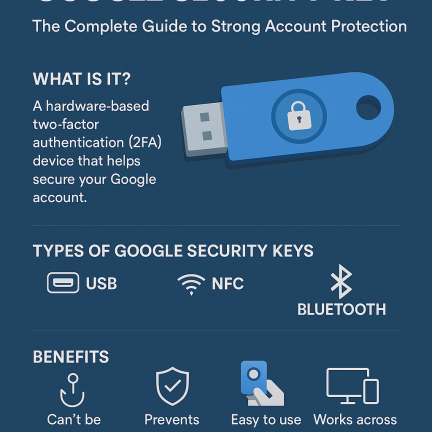
A Google Security Key is a physical device — usually connected by USB, NFC, or Bluetooth — that adds an extra layer of protection to your Google account through hardware-based two-factor authentication (2FA).
Instead of entering a code from your phone, the security key verifies your identity with a simple tap.
Think of it like a digital house key:
Your password is the lock
Your Google Security Key is the key that opens it
Even if a hacker steals your password, they still can’t access your account without your physical key.
In simple terms:
👉 A Google Security Key protects your account using hardware-based authentication, making it almost impossible to hack.
Why Google Security Keys Are So Important in 2026
Cyberattacks are becoming more advanced every year, and users need stronger protection.
Here’s why security keys matter now more than ever:
✔ Passwords can be stolen
Hackers use phishing, keylogging, and breaches to capture passwords.
✔ SMS codes are insecure
Attackers can intercept or steal verification codes.
✔ Authenticator apps are safer — but not perfect
Phone malware can still compromise app-based 2FA.
✔ Hardware keys stop 99.9% of attacks
According to Google, security keys prevented all targeted attacks during internal testing.
✔ Remote work increases risks
More logins from more devices create more opportunities for attackers.
✔ AI-powered phishing is skyrocketing
Attackers use convincing emails, messages, and fake login pages.
Security keys provide protection that software alone cannot match.
How a Google Security Key Works
Even though the device is tiny, the technology behind it is powerful.
Here’s how it works in simple steps:
1. You sign in to a Google service
Gmail, Drive, YouTube, Workspace, etc.
2. Google asks for verification
Instead of sending a code, it requests your security key.
3. You tap the key
USB: plug it in and tap
NFC: tap it on your phone
Bluetooth: press the button
4. The key verifies your identity
It uses FIDO2/WebAuthn cryptography to validate your login.
5. You’re securely logged in
Your account is protected by both:
Something you know → your password
Something you have → your security key
Even if hackers know your password, they cannot bypass the physical key.
Types of Google Security Keys
There are different models depending on your device setup.
1. USB Security Keys
Works with:
Laptops
Desktops
Chromebooks
Comes in:
USB-A
USB-C
2. NFC Security Keys
Tap the key on your smartphone.
Great for Android and iPhone users.
3. Bluetooth Security Keys
Used for wireless authentication.
Convenient but slightly less secure than USB or NFC.
4. Google Titan Security Keys
Google’s own hardware key line.
They include:
USB-A/NFC
USB-C/NFC
Bluetooth/NFC combo
Titan keys are highly rated for enterprise use.
Who Should Use a Google Security Key?
Security keys are recommended for anyone who wants strong account protection.
But they are especially important if you:
Use Google Workspace
Manage sensitive business data
Are an executive or IT professional
Have online banking tied to your email
Are a frequent target of phishing
Manage company systems or cloud access
Handle confidential files
Work remotely
Administer user accounts
Have high social media influence
In cybersecurity:
👉 Your Google account is the gateway to everything — calendar, contacts, files, passwords, apps, and communication.
A single breach can be devastating.
🔥 Why Google Security Keys Are More Secure Than Traditional 2FA
Let’s break down the differences.
1. Cannot be phished
Hackers cannot trick your security key into authenticating their fake login page.
2. Cannot be intercepted
Unlike SMS, the key generates authentication locally — no codes to steal.
3. Protected from malware
Even if your phone or PC is infected, the attacker cannot bypass the key.
4. No password reuse risk
The key uses unique cryptographic signatures per site.
5. Prevents remote account takeover
Hackers cannot log in without your physical device.
6. Supports modern authentication standards
Including:
FIDO2
WebAuthn
U2F
This makes it future-proof.
🧩 Google Security Key Use Cases in Cybersecurity & IT
Organizations use security keys for:
✔ Zero Trust authentication
Security keys help maintain strict identity verification.
✔ Admin account protection
Admins are top targets for attacks; keys reduce risk dramatically.
✔ Cloud access security
Google Workspace, AWS, Azure, GCP access is protected.
✔ Protection against credential theft
Even stolen passwords become useless.
✔ Compliance requirements
Security keys support GDPR, HIPAA, SOC, and other frameworks.
✔ Remote workforce authentication
Your team can securely log in from anywhere.
How to Set Up a Google Security Key
It only takes a few minutes.
Step 1: Go to your Google Account
Navigate to: Security > 2-Step Verification
Step 2: Add a Security Key
Choose from:
USB
Bluetooth
NFC
Step 3: Insert or tap your key
Follow the on-screen instructions.
Step 4: Name your key
Example: “Work Key” or “Travel Key.”
Step 5: Add a backup key
Highly recommended in case you lose the first one.
Your Google account is now protected by hardware authentication.
🔧 Pros and Cons of Google Security Keys
No security tool is perfect, so let’s look at the real picture.
⭐ Pros
✔ Extremely secure
✔ Blocks phishing attacks
✔ Easy to use
✔ Fast authentication
✔ Works across devices
✔ Supports major security standards
✔ Recommended by cybersecurity experts
✔ Works for personal + business accounts
⭐ Cons
❌ You must carry it with you
❌ Can be lost (mitigated with backup keys)
❌ Initial setup required
❌ Not all services support hardware keys
Still, the benefits outweigh the limitations.
🔍 Google Security Key vs Other Authentication Methods
Here’s a quick comparison:
| Method | Security Level | Convenience |
|---|---|---|
| Password only | Very Low | High |
| SMS 2FA | Low | Medium |
| Authenticator App | Medium | Medium |
| Push Notifications | Medium | High |
| Google Security Key | Very High | High |
Hardware keys provide the best mix of security and simplicity.
🧠 Best Practices for Using Google Security Keys
Follow these tips for maximum protection:
✔ Register at least 2 keys
One for everyday use, one as a backup.
✔ Store your backup key securely
Keep it in a safe, drawer, or office.
✔ Do not share your key
Each person should have their own.
✔ Use a passkey or device lock
Prevents unauthorized physical access.
✔ Use security keys for all important accounts
Like banking, GitHub, and cloud services.
✔ Combine with EDR
Protect endpoints from malware or keyloggers.
🎯 Conclusion: Google Security Keys Offer Top-Tier Protection
If you’ve ever wondered how to secure your Google account from hackers, phishing, and account takeovers, the answer is simple:
👉 Use a Google Security Key.
It’s the strongest, most effective way to lock down your digital identity and protect your personal or business data. With cyberattacks growing more sophisticated, hardware authentication is no longer optional — it’s essential.
Stay secure. Stay protected.
🔐 Enhance Your Cybersecurity with Xcitium OpenEDR (Free Registration)
Protect your endpoints and accounts with advanced threat detection and real-time containment.
👉 https://openedr.platform.xcitium.com/register/
❓ FAQs About Google Security Keys
1. What is a Google Security Key?
A hardware authentication device that verifies your identity during login.
2. Is a Google Security Key better than SMS codes?
Yes — it’s much more secure and resistant to phishing.
3. Can I use one key for multiple accounts?
Yes. You can register it with many online services.
4. What if I lose my security key?
Use your backup key or recovery codes.
5. Are Google Security Keys good for businesses?
Absolutely — especially for admins, IT teams, executives, and remote workers.

 Loading...