
Updated on November 19, 2025, by OpenEDR
When was the last time you updated one of your passwords? If you’re like most people, the honest answer is: “I can’t remember.” And that’s exactly why cybercriminals love targeting passwords—they’re usually the weakest link in cybersecurity. In fact, over 80% of data breaches involve compromised or weak passwords, making password security one of the most important habits you can build in 2025.
Whether you’re an IT manager, CEO, cybersecurity professional, or simply someone who wants to protect their online accounts, this guide will walk you through everything you need to know about password security—how it works, why it matters, and how to get it right.
Let’s break it down in a simple, conversational way.
⭐ What Is Password Security? (Simple Definition)
Password security refers to all the practices, tools, and strategies used to create, manage, and protect passwords so attackers can’t guess or steal them.
Good password security means:
Using strong, unique passwords
Avoiding predictable patterns
Protecting passwords from theft
Keeping accounts locked behind multiple layers of authentication
Using secure tools like password managers
Think of password security as locking the front door of your digital life—and using a strong lock instead of a flimsy one.
⭐ Why Password Security Matters More Than Ever in 2025
Here’s the truth: cybercriminals don’t “hack” passwords—they usually steal, guess, or trick you into revealing them.
And with more of us using cloud apps, online banking, social media, and remote work accounts, the risk has skyrocketed.
Here’s why password security is essential today:
✔ Cyberattacks are more frequent
Attackers use brute force tools to attempt millions of password combinations in seconds.
✔ Data breaches leak billions of usernames and passwords
Even if you didn’t leak yours, a website you use might have.
✔ Reusing passwords is dangerous
One breached password = dozens of compromised accounts.
✔ Work-from-anywhere increases risk
Employees use personal devices, public Wi-Fi, and cloud apps more than ever.
✔ Phishing is at an all-time high
Cybercriminals trick people into giving away passwords without even realizing it.
Password security is no longer optional—it’s essential.
🔐 How Hackers Steal Passwords (It’s Easier Than You Think)
To improve password security, you need to understand how passwords are compromised.
Here are the most common attack methods:
1. Phishing Attacks
Fake emails, texts, or websites that trick you into entering your password.
2. Credential Stuffing
Hackers take leaked passwords from one site and try them on others.
3. Brute Force Attacks
Attackers use software to guess millions of password combinations per second.
4. Keylogging Malware
Malicious software records your keystrokes—including passwords.
5. Social Engineering
Manipulating people psychologically to reveal sensitive information.
6. Public Wi-Fi Snooping
Attackers intercept your traffic and capture login credentials.
7. Weak or Reused Passwords
A shocking number of people still use passwords like:
password123
123456
qwerty
admin
Hackers love these.
🧠 What Makes a Password Strong? (The Science Behind It)
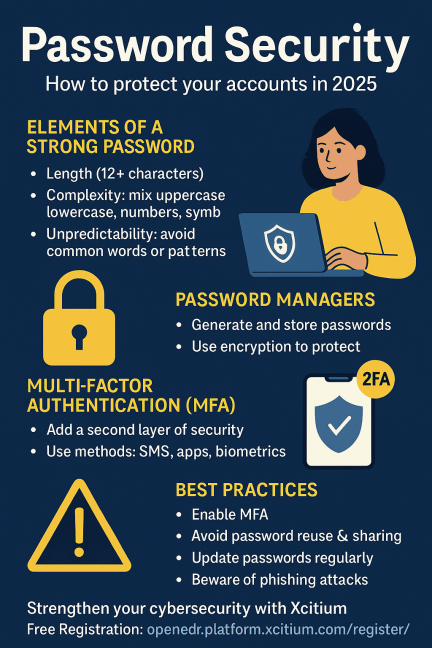
Password strength depends on three major factors:
1. Length
The longer the password, the harder it is to crack.
Recommended: 12–16 characters minimum.
2. Complexity
Combine:
Uppercase letters
Lowercase letters
Numbers
Special characters
3. Unpredictability
Avoid:
❌ Names
❌ Birthdays
❌ Phone numbers
❌ Dictionary words
Strong passwords look like this:
👉 W@terFall_92!GrowSky
Or better yet, use passphrases:
👉 PurpleCameraSingsBrightly!
Easy to remember, but hard to crack.
🔐 Password Managers: The Secret Weapon of Password Security
If remembering dozens of complex passwords sounds impossible, that’s because it is.
That’s where password managers come in.
A password manager helps you:
✔ Generate strong passwords
✔ Store them securely
✔ Auto-fill them
✔ Sync passwords across devices
✔ Protect them with encryption
✔ Prevent reuse
Top password managers include:
Bitwarden
1Password
LastPass
Dashlane
Keeper
This one tool alone can dramatically improve your password security.
📲 Multi-Factor Authentication (MFA): Your Extra Layer of Defense
Even if someone steals your password, MFA keeps your accounts safe.
MFA includes:
SMS codes
Authenticator apps
Hardware security keys
Email verification
Biometric unlock
MFA can prevent over 90% of account takeover attempts.
If a service offers MFA, turn it on. Period.
⚠️ Common Password Security Mistakes (And How to Fix Them)
Let’s fix the biggest problems most people make.
❌ Using the same password everywhere
If one site leaks your password, attackers try it everywhere.
➡️ Solution: Use unique passwords.
❌ Writing passwords on sticky notes or in text files
If someone gets access to your device, your passwords are gone.
➡️ Solution: Use a password manager.
❌ Ignoring updates
Outdated apps and OS versions have security flaws.
➡️ Solution: Turn on automatic updates.
❌ Disabling MFA
Many users skip MFA out of convenience.
➡️ Solution: Enable MFA on all essential accounts.
❌ Using easy-to-guess passwords
Names, pets, phone numbers, simple patterns = unsafe.
➡️ Solution: Use strong passphrases.
🛠️ How to Create a Strong Password Security Strategy (Step-by-Step)
Here’s a simple plan you can follow today.
Step 1: Review your current passwords
Check if any are:
Repeated
Old
Weak
Breached
Step 2: Switch to a password manager
This solves 90% of password problems.
Step 3: Enable MFA on all accounts
Especially for:
Email
Banking
Work systems
Social media
Step 4: Avoid using personal information
No birthdays, addresses, or names.
Step 5: Update passwords regularly
Every 90 days for critical accounts.
Step 6: Use passphrases for memorability
Example:
👉 GoldenTigerRunsFast!2025
Step 7: Protect your devices
Passwords are meaningless if your phone or laptop is infected.
Use:
✔ EDR
✔ Antivirus
✔ VPN
✔ Screen lock
This is crucial for business environments.
🔐 Password Security for Businesses
Organizations face bigger risks than individual users.
Weak passwords can cause:
Ransomware attacks
Lateral movement
Insider threats
Unauthorized access
Data breaches
Compliance violations
Businesses must enforce:
✔ Strong password policies
✔ Employee cybersecurity training
✔ MFA company-wide
✔ Endpoint protection
✔ Centralized password management tools
✔ Zero trust controls
✔ Regular penetration testing
A single weak password can cost millions.
📊 Password Security Statistics You Should Know
81% of data breaches involve weak or stolen passwords
50% of employees reuse passwords across work & personal accounts
25% of people use the same password for over 10 accounts
“123456” is still the most common password
MFA prevents 90%+ of account takeovers
These numbers explain why attackers rely heavily on password-based attacks.
🔐 Password Security Tools That Enterprise Teams Use
Here are the most important tools in 2025:
✔ Password Managers (Enterprise)
Keeps employee credentials secure.
✔ Single Sign-On (SSO)
One secure login for multiple applications.
✔ Multi-Factor Authentication (MFA)
Critical for remote teams.
✔ Endpoint Detection & Response (EDR)**
Stops keyloggers, malware, and credential theft.
✔ Zero Trust Access Solutions
Never trust—always verify.
Tools like Xcitium OpenEDR help detect and block password-stealing malware before it causes damage.
🧭 Best Practices for Password Security in 2026
Follow these to stay safe:
Use long, unique passwords
Enable MFA everywhere
Use password managers
Change passwords after breaches
Avoid sharing passwords
Don’t log in on public Wi-Fi
Keep software updated
Use biometric authentication
Avoid clicking suspicious links
Protect device access with PINs
Small habits build strong defenses.
🎯 Conclusion: Password Security Is Your First Line of Defense
If you’ve been wondering how to protect your accounts, simplify your digital life, and stay safe from attackers, the answer starts with password security. Strong passwords, password managers, MFA, and smart habits go a long way in protecting every part of your online identity.
Cybercriminals are getting smarter—but so can you. With the right tools and practices, you can make your accounts nearly impossible to breach.
🔐 Strengthen Your Cybersecurity with Xcitium (Free Registration)
Protect your devices, data, and accounts with advanced endpoint threat detection.
👉 https://openedr.platform.xcitium.com/register/
❓ FAQs About Password Security
1. What is the safest way to store passwords?
A password manager with strong encryption.
2. How long should my passwords be?
At least 12–16 characters.
3. Should I change my passwords regularly?
Yes, especially for sensitive or work accounts.
4. Is MFA really necessary?
Absolutely — it blocks most account takeover attempts.
5. Can hackers guess long passwords?
It’s extremely difficult if your passwords are long, unique, and random.

 Loading...