
Updated on November 18, 2025, by OpenEDR
Are your employees constantly complaining about slow performance, unexpected crashes, or security issues? You’re not alone. Nearly 72% of businesses struggle with PC-related downtime every year, leading to lost productivity, increased IT costs, and unnecessary frustration. That’s why having reliable PC solutions is essential for every modern organization—whether you’re a startup, enterprise, or cybersecurity-driven company.
In this comprehensive guide, you’ll learn the most effective PC solutions to improve performance, enhance security, reduce downtime, and streamline IT operations. From troubleshooting common issues to implementing enterprise-level cybersecurity practices, this guide is built for IT managers, cybersecurity experts, and business leaders who want efficient, scalable, and secure PC environments.
Why Businesses Need Effective PC Solutions
Computers remain the backbone of nearly every industry—finance, healthcare, tech, manufacturing, retail, and more. However, unmanaged systems invite:
Slowdowns
Malware infections
Network vulnerabilities
Hardware failures
Data loss
Without strong PC solutions, productivity stalls and security risks increase. Implementing the right strategies ensures systems run smoothly, securely, and reliably across your organization.
Common PC Issues and Their Causes
Before applying PC solutions, it’s important to understand the issues businesses face most often.
🔧 1. Slow PC Performance
Caused by:
Low RAM
Too many startup apps
Fragmented drives
Outdated software
Malware infections
💥 2. Frequent System Crashes
Often related to:
Overheating
Corrupted system files
Failing hardware
Incompatible software
🦠 3. Malware & Virus Infections
A major business threat, triggered by:
Unsafe downloads
Phishing emails
Outdated antivirus protection
Vulnerable third-party applications
🌐 4. Network Connectivity Problems
Usually caused by:
Outdated network drivers
Router misconfigurations
DNS issues
Firewall blocks
Understanding the cause helps IT teams deploy the right PC solutions faster and more accurately.
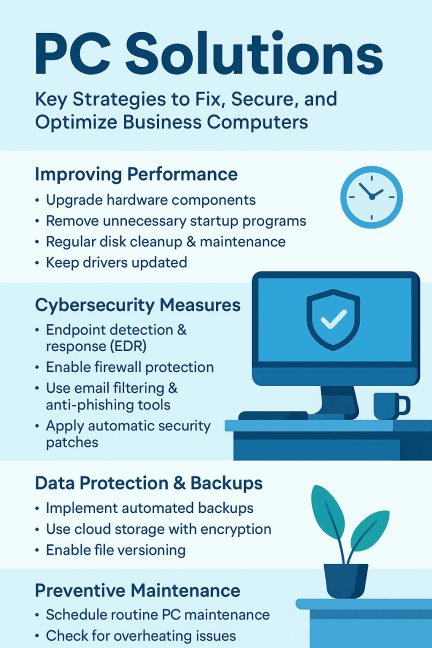
Top PC Solutions for Improving Performance
Optimizing performance is a core goal for IT managers and business leaders. Below are the most effective strategies.
1. Upgrade Hardware Components
🔹 RAM Upgrade
Moving from 8GB → 16GB or 32GB dramatically improves:
Multitasking
System responsiveness
Software performance
🔹 SSD Installation
Switching from HDD to SSD increases speed up to 10x, making it one of the best PC solutions.
2. Remove Unnecessary Startup Programs
Too many startup applications slow down boot time.
Steps to fix:
Windows Task Manager → Startup
Disable unused apps (Teams, Spotify, Chrome autostart, etc.)
This alone can boost performance instantly.
3. Regular Disk Cleanup & Maintenance
Use built-in tools like:
Disk Cleanup
Storage Sense
Defragment & Optimize Drives
These remove junk files, optimize storage, and improve stability.
4. Keep Drivers Updated
Outdated drivers cause crashes, poor performance, and hardware malfunctions.
Use:
Windows Update
Manufacturer driver tools (Dell, HP, Lenovo)
Trusted driver management software
Cybersecurity-Focused PC Solutions for Modern Businesses
Today’s cybercriminals target endpoints more than ever. Securing PCs is non-negotiable.
1. Deploy Advanced Antivirus & EDR Solutions
Traditional antivirus is not enough for enterprise environments.
Modern businesses need:
EDR (Endpoint Detection & Response)
Zero-day malware prevention
Behavior-based threat detection
EDR solutions help detect and isolate threats before they spread across networks.
2. Enable Firewall Protection
A correctly configured firewall stops:
Unauthorized access
Suspicious outbound connections
Malware communication
Network intrusions
Always keep the firewall active and updated.
3. Use Email Filtering and Anti-Phishing Tools
Since 90% of cyberattacks begin with phishing, email security is critical.
Email filters block:
Spam
Malware attachments
Malicious links
Spoofed emails
Secure email gateways are vital for corporate protection.
4. Apply Automatic Security Patches
Unpatched systems are the easiest target for hackers.
Automate updates for:
OS
Applications
Browsers
Firmware
Security patching is foundational to strong PC solutions.
5. Strengthen Access Controls
Use:
MFA (Multi-factor authentication)
Strong passwords
Role-based access
Least-privilege principles
This reduces unauthorized access dramatically.
PC Solutions for Network Stability & Speed
Fast and reliable connectivity is essential for business operations.
1. Update Network Drivers
Outdated drivers restrict bandwidth and cause dropouts.
2. Optimize Router & Access Point Settings
Recommendations:
Update firmware
Use 5GHz networks
Enable QoS for business apps
Limit guest network access
3. Use Wired Connections When Possible
Ethernet is always faster and more stable than Wi-Fi.
Data Protection & Backup PC Solutions
Data is a company’s most valuable asset. Protecting it must be a top priority.
1. Implement Automated Backups
Follow the 3–2–1 backup rule:
3 copies of your data
2 different locations
1 off-site or cloud backup
This prevents data loss from:
Ransomware
Hardware failure
User error
2. Use Cloud Storage with Encryption
Cloud storage offers:
Remote accessibility
Redundancy
Encrypted protection
Services like OneDrive, Google Drive, and enterprise cloud systems are safe and reliable.
3. Enable File Versioning
If a file becomes corrupted or encrypted by malware, versioning allows restorations instantly.
Preventive PC Maintenance Strategies
Preventive care is one of the most overlooked yet powerful PC solutions for extending device lifespan.
🔧 1. Schedule Routine PC Maintenance
Monthly routines include:
Removing temporary files
Running antivirus scans
Cleaning browser caches
Reviewing installed software
🔌 2. Check for Overheating Issues
Clean:
Fans
Air vents
Internal dust buildup
Overheating leads to crashes and long-term system damage.
🔄 3. Reinstall OS When Needed
Sometimes the best fix is a fresh start.
Reinstallation helps with:
Malware removal
Corrupted system files
Performance restoration
Enterprise-Grade PC Solutions for IT Managers & CEOs
Businesses require scalable, secure, and centralized PC management.
1. Centralized Endpoint Management
Tools like:
Microsoft Intune
Xcitium OpenEDR
VMware Workspace ONE
…help IT teams manage:
Policies
Security updates
Software installations
Device configurations
2. Asset Tracking & Monitoring
Track:
Hardware health
Warranty status
Software usage
Security posture
This reduces downtime and improves planning.
3. Remote Troubleshooting Tools
Remote IT access reduces on-site workload and resolves issues faster.
Conclusion: Build a Fast, Secure, and Reliable PC Environment
Strong PC solutions are essential for productivity, cybersecurity, and long-term business success. Whether you’re optimizing performance, improving security, or planning long-term IT strategies, the steps in this guide provide everything needed to keep your computers running smoothly.
For businesses that want advanced, automated threat detection and endpoint protection:
👉 Sign up for enterprise-grade protection today:
🔐 https://openedr.platform.xcitium.com/register/
FAQs About PC Solutions
1. What are the best PC solutions for improving performance?
Upgrading to SSDs, increasing RAM, removing startup apps, and updating drivers are the most effective methods.
2. How do I stop my PC from crashing?
Check for overheating, run malware scans, update drivers, and inspect hardware components.
3. What PC solutions help prevent viruses?
Use EDR software, enable firewalls, apply patches, and avoid downloading unknown files.
4. How often should I maintain my PC?
A monthly maintenance routine helps keep your device fast and secure.
5. What tools should businesses use to manage PCs?
Centralized tools like Intune and OpenEDR automate security, updates, and monitoring.

 Loading...