
Updated on September 11, 2026, by OpenEDR
How to Choose the Right Driver Updater
Windows driver update software identifies outdated, missing, or incompatible device drivers and helps install appropriate replacements. Windows Update already handles many recommended drivers automatically, while dedicated driver updater tools can be useful for troubleshooting missing drivers, creating backups, performing offline updates, or managing driver updates more efficiently.
Have you ever experienced your computer freezing, a printer refusing to connect, or your graphics card suddenly glitching? These issues often stem from outdated or missing drivers—and that’s where Windows driver update software becomes essential.
In this guide, we’ll explore what driver update software is, why keeping your drivers current matters, and how the best tools in 2026 can help IT professionals, cybersecurity experts, and businesses maintain optimized, secure systems.
What Is Windows Driver Update Software?
Windows driver update software is a utility designed to automatically identify, download, and install the latest versions of hardware drivers for your computer. Drivers act as a bridge between your operating system and hardware components, ensuring devices like your mouse, graphics card, and network adapter function correctly.
Without updated drivers, your PC may experience performance degradation, system crashes, or even vulnerabilities that hackers can exploit.
Examples of Devices That Rely on Drivers:
Graphics cards (GPU)
Network adapters and Wi-Fi cards
Audio devices
USB and Bluetooth peripherals
Printers and scanners
Why Driver Updates Are Crucial:
Performance: New drivers optimize performance and fix bugs.
Security: Patches close vulnerabilities that attackers could exploit.
Compatibility: Updates ensure smooth operation with new OS versions and applications.
Best Ways to Update Drivers in Windows
There are several ways to obtain Windows drivers.
| Method | Best For | Automation | Recommended Use |
|---|---|---|---|
| Windows Update | Most Windows users | High | First choice |
| PC manufacturer’s support tool/site | Laptops and branded desktops | Varies | Device-specific drivers |
| Hardware manufacturer’s site | GPU, chipset and individual components | Low | Specific/latest driver needs |
| Device Manager | Individual-device troubleshooting | Limited | Manual troubleshooting |
| Third-party driver updater | Automation, backup, offline scenarios | High | Secondary/specialized option |
For most users, start with Windows Update, then check the computer or hardware manufacturer’s official support channel if a necessary driver is unavailable.
How to Update Drivers With Windows Update
Windows 11 can automatically install recommended drivers through Windows Update.
To check for updates:
- Open Settings.
- Select Windows Update.
- Click Check for updates.
- Install available recommended updates.
- Restart the PC if necessary.
How to Check Optional Driver Updates
Some driver updates are classified as optional.
Go to:
Settings → Windows Update → Advanced options → Optional updates
If driver updates are listed, review them before selecting Download and install.
Optional does not necessarily mean the driver is required. If your hardware works correctly, investigate why you need the update before installing it.
Why You Need Windows Driver Update Software
While Windows provides some driver updates via Windows Update, it often misses device-specific optimizations or releases them late.
Here’s where dedicated driver update tools excel:
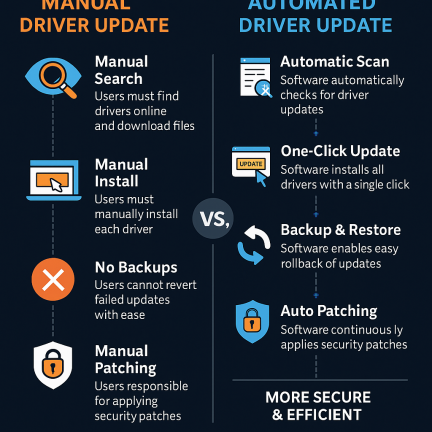
Automatic Scanning: Detects outdated or missing drivers in one click.
Verified Updates: Downloads drivers directly from official manufacturers.
Backup & Restore: Saves current drivers for rollback if needed.
Time Efficiency: Automates manual searching and installation.
Enhanced Stability: Reduces system errors and crashes caused by driver conflicts.
How Windows Driver Update Software Works
These programs streamline what used to be a technical headache into a simple, automated process:
Scan: The software checks your system for missing or outdated drivers.
Analyze: It matches your hardware to the manufacturer’s latest driver version.
Download: Retrieves authentic drivers from secure sources.
Install: Updates your drivers seamlessly—often without rebooting.
Backup: Stores your previous drivers in case you need to revert changes.
Top Features to Look for in Driver Update Software
When selecting a Windows driver updater, pay attention to these essential features:
1. Automatic Driver Scanning
Schedule scans to ensure drivers remain current without manual intervention.
2. One-Click Updates
Simplify maintenance with batch updates instead of individual installations.
3. Driver Backup and Restore
This feature allows safe reversion if a new driver causes instability.
4. Offline Driver Installation
Some tools let you download drivers on another computer—useful for offline or air-gapped systems.
5. WHQL Certification
Always choose software that only installs Windows Hardware Quality Labs (WHQL) certified drivers to ensure authenticity and safety.
6. Performance Optimization
Advanced utilities can also enhance hardware performance, especially for GPUs and audio devices.
Top 5 Windows Driver Update Software in 2026
1. Driver Booster by IObit
Best for: Home and business users.
Features: Automatic scan, rollback, game-ready drivers, and offline installation.
Pros: Fast scans and large driver database.
2. Ashampoo Driver Updater
Best for: Users seeking simplicity and security.
Features: WHQL-certified driver database, easy interface, restore options.
Pros: Excellent compatibility with Windows 11 and earlier versions.
3. Snappy Driver Installer
Best for: IT administrators managing multiple PCs.
Features: Portable, open-source, and works offline.
Pros: No ads or bundled software.
4. AVG Driver Updater
Best for: Professionals who prioritize reliability.
Features: Detects over 8 million drivers, performance analytics, rollback support.
Pros: Strong reputation in cybersecurity.
5. Xcitium OpenEDR with Driver Security Integration
Best for: Enterprises seeking performance and security.
Features: Detects outdated drivers, monitors vulnerabilities, and protects endpoints from driver-based exploits.
Pros: Combines endpoint protection with system performance optimization.
👉 Try Xcitium OpenEDR for integrated driver security and real-time threat monitoring.
Signs a Driver May Be Outdated or Corrupted
Common signs include:
- Hardware stops responding.
- Windows cannot recognize a device.
- Wi-Fi or Bluetooth disconnects frequently.
- Audio stops working.
- Graphics become unstable.
- A printer stops communicating with Windows.
- Windows displays device-related errors.
- The system experiences hardware-related crashes.
- Performance deteriorates after a Windows update.
- Device Manager displays a warning symbol.
These symptoms do not automatically prove that an outdated driver is responsible. Hardware failure, Windows configuration, malware, software conflicts, and other issues can cause similar problems.
Security Risks of Outdated Drivers
Outdated or unverified drivers aren’t just an inconvenience—they’re a serious security risk. Cybercriminals can exploit driver vulnerabilities to gain kernel-level access, bypassing antivirus tools and firewalls.
Examples of Driver-Based Threats:
Rootkits: Malware that embeds itself into driver files to hide from detection.
Privilege Escalation: Hackers use flawed drivers to gain admin-level control.
Supply Chain Attacks: Malicious drivers are injected during software distribution.
Protecting Against Driver Exploits:
Use software that verifies driver signatures.
Keep endpoint protection active at all times.
Monitor for anomalies using EDR (Endpoint Detection & Response) tools like OpenEDR.
How to Choose the Right Driver Update Software
When selecting a driver updater for personal or business use, consider:
| Criteria | Why It Matters |
|---|---|
| Authenticity | Only download drivers verified by manufacturers. |
| Ease of Use | Simple interfaces reduce errors and training needs. |
| Automation | Save time with scheduled scans and auto-updates. |
| Backup Features | Ensure safe recovery in case of failed updates. |
| Security Features | Protect against driver tampering and malware. |
Steps to Manually Update Windows Drivers
Even without third-party software, you can manually update drivers using these methods:
1. Through Windows Update
Go to Settings → Windows Update → Check for Updates.
Windows will automatically download available drivers.
2. Device Manager
Open Device Manager → Right-click a device → Update driver → Choose “Search automatically.”
3. Manufacturer’s Website
Visit the official website for your hardware and download the latest drivers.
However, manual updates are time-consuming, risky, and inefficient for enterprises managing multiple devices.
The Role of Driver Updates in Enterprise Security
In large organizations, driver management directly affects endpoint protection and compliance.
Unpatched drivers can become entry points for cyberattacks, especially in BYOD (Bring Your Own Device) environments.
Benefits of Enterprise-Level Driver Management:
Reduces attack surfaces.
Ensures consistent system performance across the network.
Helps comply with security frameworks like NIST and ISO 27001.
Why Combine Driver Updates with Endpoint Security
Integrating driver management with endpoint protection provides layered defense:
Driver updates close performance and compatibility gaps.
Endpoint security blocks malicious activity and detects anomalies.
Combined tools like Xcitium OpenEDR automate both—ensuring real-time protection and efficiency.
Final Thoughts: Keep Your Drivers—and Your Business—Up to Date
Outdated drivers can slow systems, cause crashes, and expose your organization to cyberattacks. Investing in a reliable Windows driver update software is a simple yet powerful way to ensure system stability, efficiency, and safety.
For businesses, the smartest choice is driver management integrated with endpoint protection—like Xcitium’s OpenEDR, which continuously monitors, detects, and neutralizes threats.
FAQs on Windows Driver Update Software
1. Why should I update my drivers regularly?
To ensure better performance, fix bugs, and patch security vulnerabilities that attackers could exploit.
2. Can I rely on Windows Update for driver updates?
Windows Update covers only basic drivers; dedicated software ensures broader, faster coverage.
3. Are driver updater tools safe to use?
Yes, as long as you choose reputable software with verified, signed drivers.
4. How often should I scan for driver updates?
Monthly scans are ideal, though mission-critical systems may require weekly checks.
5. Can outdated drivers cause system crashes?
Absolutely. Old or corrupt drivers can cause instability, blue screens, and hardware malfunctions.


 (2 votes, average: 3.50 out of 5)
 Loading...